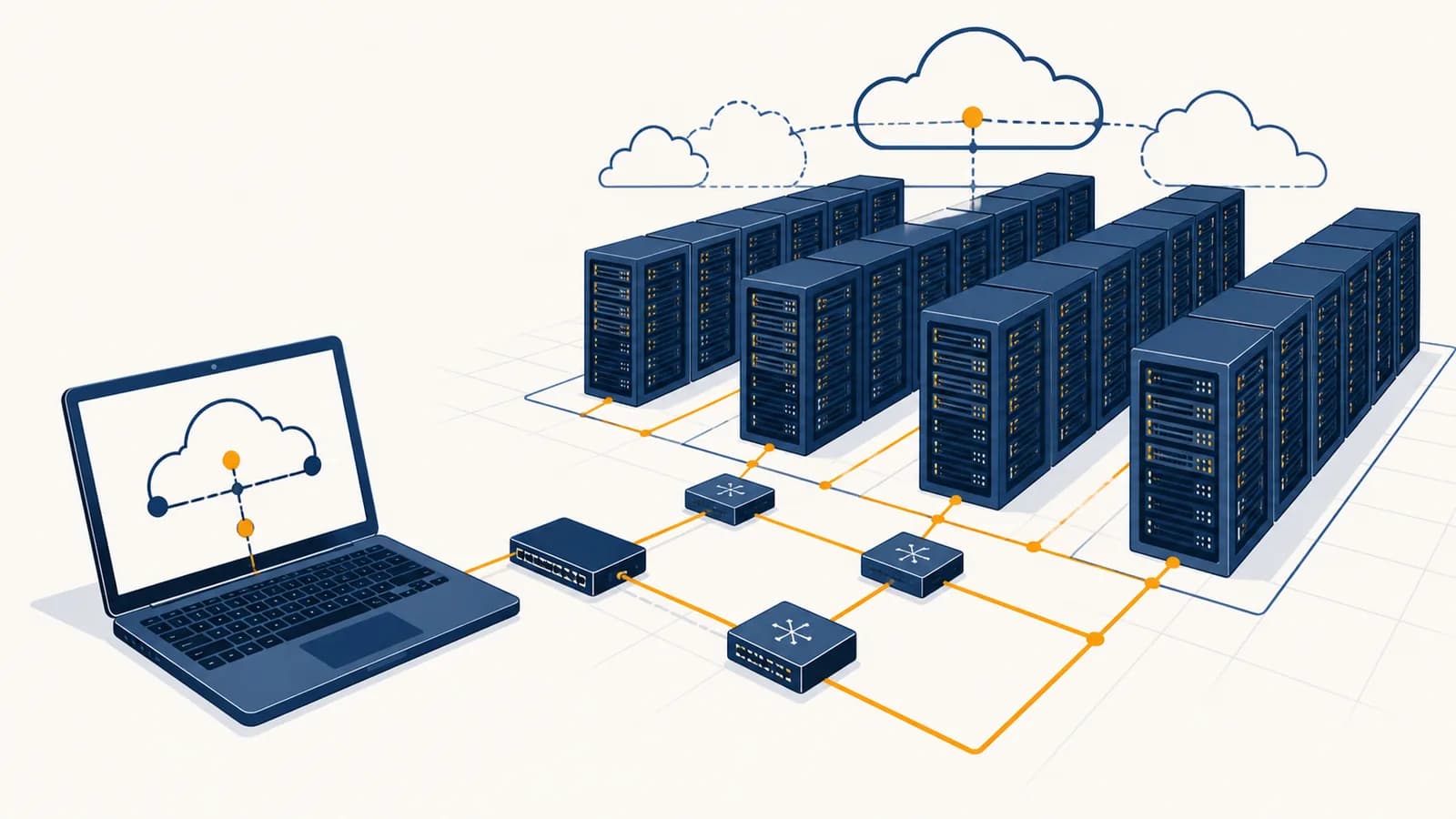
Cloud computing is a way of delivering computing resources over a network, in the context of computer systems and the internet. A cloud service lets people rent servers, storage, databases, or software instead of buying and maintaining every machine themselves. Put more simply, cloud computing means using someone else’s computer through the internet. It exists because most people and organizations need computing that can grow, shrink, and recover without requiring them to own a room full of hardware.
The phrase “someone else’s computer” is useful, but incomplete. The cloud is not one distant supercomputer. It is a large collection of physical computers, network switches, storage devices, power systems, and control software. Together, they make computing resources feel available on demand.
A photo backup, a school document, an online game, and a company payroll system can all use cloud computing. They may use very different hardware and software, but the basic exchange is the same: a device sends a request, remote computers perform work or retrieve data, and the result travels back through a network.
What cloud computing actually is
Cloud computing is the organized rental of computing capacity as a service. A provider owns and operates the physical equipment, while a customer requests a defined resource, accesses it through a network, and usually pays according to time, capacity, or use.
A computing resource can be processor time, working memory, disk space, a database, a message queue, or a complete application. Calling it a service means the customer asks for an outcome through an interface. The customer does not usually choose a particular circuit board or carry a disk into the provider’s building.
The physical machines live in data centers. A data center is a secured building designed to keep computer equipment powered, cooled, connected, and monitored. Providers often operate data centers in several geographic areas. Software tracks the machines and assigns customer workloads to equipment with available capacity.
Cloud does not mean weightless or locationless. Every cloud file occupies physical storage somewhere, every calculation runs on a processor, and every response uses cables, radio links, switches, electricity, and cooling.
Cloud services are commonly grouped by how much of the system the provider manages:
- Infrastructure as a service, or IaaS: the provider supplies virtual machines, networks, and storage. The customer manages the operating system and application.
- Platform as a service, or PaaS: the provider also manages the operating system and application runtime. The customer supplies code and configuration.
- Software as a service, or SaaS: the provider runs the complete application. The customer signs in and uses it.
Those boundaries are choices about responsibility. A virtual server gives a team more control but also more maintenance. A hosted email application gives less low-level control, yet removes tasks such as patching its operating system. This relationship becomes clearer after studying how operating systems manage programs, memory, and devices.
How a cloud request works
A cloud request moves through a chain of cooperating systems. A client finds a service address, opens a network connection, proves its identity when required, sends structured data, and waits while remote software reads, computes, stores, or returns the requested result.
Suppose a student opens a cloud document. The visible action is one click, but several mechanisms cooperate behind it.
The device asks the Domain Name System for the network address associated with the service’s domain name.
The client and server establish an encrypted session, commonly using TLS, so intermediate networks cannot easily read or alter the exchange.
The service checks a password, session token, security key, or another credential before revealing private data.
A load balancer sends the request to an available application server rather than forcing every user through one machine.
Application code checks permission, asks a database for metadata, and reads the document content from storage or a nearby cache.
The service sends a response. The browser interprets it, updates the screen, and may keep a local copy for faster use.
The internet carries the messages, while the cloud service decides what to do with them. These are related systems, not synonyms. A fuller account of packets, routers, names, and protocols appears in the explanation of how internet traffic reaches its destination.
The delay between request and response is called latency. Distance contributes because signals take time to travel, but server workload, network congestion, encryption, and database access also matter. Providers place copies of popular content closer to users through content delivery networks, which reduce the distance that each request must travel.
How virtualization turns one machine into many
Virtualization uses software to divide a physical computer into isolated virtual computers. Each virtual machine receives a controlled share of processor time, memory, storage, and network access, so several customers can use one server without intentionally sharing applications or files.
A program called a hypervisor creates and manages virtual machines. To software inside a virtual machine, the assigned processor, disk, and network card appear like ordinary hardware. The hypervisor translates or schedules access to the real hardware underneath.
One tangible machine contains processors, memory modules, storage connections, and network interfaces. Its total capacity is finite.
A software-defined computer receives a chosen portion of that capacity and runs its own operating system in an isolated environment.
Imagine a physical server with 64 processor cores and 256 gigabytes of memory. A provider could assign four virtual machines 8 cores and 32 gigabytes each, then use the remaining capacity for other machines and system overhead. This example does not promise that all virtual machines receive a dedicated physical core. Providers may schedule more virtual capacity than is used at once, based on the fact that most workloads do not run at maximum demand continuously.
Containers divide a system differently. Instead of pretending to be complete computers, containers isolate processes while sharing the host operating system’s kernel. They tend to start faster and use less memory than virtual machines, but the shared kernel changes the isolation boundary. Teams often run containers inside virtual machines, gaining both a strong outer boundary and efficient application packaging.
Virtualization makes rapid provisioning possible. Creating a virtual server can mean recording a configuration and copying a disk image, not unpacking a new physical machine. An automated control system can start replacements after a failure or add instances during heavy demand.
How cloud storage keeps data available
Cloud storage keeps data on provider-managed storage devices and exposes it through network interfaces. Availability comes from redundant copies, error checks, monitoring, and planned recovery, while durability depends on preserving correct data even when individual disks, machines, or facilities fail.
Cloud storage is not one product. Object storage holds files as objects with identifiers and metadata, which suits photos, videos, backups, and large datasets. Block storage presents chunks that a virtual machine can treat like a disk. File storage presents familiar folders and filenames to several machines.
Saving the same file on more than one device is called replication. If one disk fails, another copy can answer. Providers may also use erasure coding, which breaks data into pieces and calculates additional recovery pieces. The original can then be reconstructed even when some pieces are unavailable.
Your phone uploads an image in several chunks. The service verifies that the received bytes match their checksums, stores the content redundantly, records its owner and filename in a database, then acknowledges success. A later download may come from a different physical device than the upload reached.
A checksum is a value calculated from data. The storage system calculates it again when moving or reading the data. A mismatch signals accidental corruption. Checksums detect changes, but they are not automatically proof of who created a file. Cryptographic signatures serve that different purpose.
Replication also raises a timing problem. If two people edit the same document through different servers, those servers need a consistent view of the latest state. Some systems make a write wait until several copies confirm it. Others return sooner and allow replicas to catch up. Faster replies, stronger immediate consistency, lower cost, and tolerance of network failures pull system design in different directions.
Metadata such as ownership, edit time, and sharing permissions commonly lives in a database, while large file bytes live in object storage. The distinction matters because searching and updating structured records needs different machinery from holding a billion large blobs. See how databases organize, query, and protect structured data for that side of the system.
Public cloud versus private systems
Public cloud uses infrastructure operated for many customers, while a private system is dedicated to one organization. The useful choice depends on control, legal duties, existing equipment, staff skills, response time, cost patterns, and the harm caused by an outage.
| Approach | Who operates the hardware | Typical strength | Typical burden |
|---|---|---|---|
| Public cloud | A cloud provider | Fast access to varied services and capacity | Provider rules, ongoing charges, and less hardware control |
| Private cloud | One organization or its contractor | Dedicated environment with chosen controls | Equipment, staffing, upgrades, and capacity planning |
| Hybrid cloud | Both parties | Workloads can be placed according to their needs | More complex identity, networking, and operations |
| On-premises system | The organization at its own site | Direct physical control and possible local access | Purchasing, power, cooling, repairs, and replacement |
A private cloud is more than ordinary servers in an office. It uses cloud-like management, such as self-service requests, shared resource pools, automation, and measured capacity, but reserves those resources for one organization. An on-premises system can be manually managed without those features.
Hybrid cloud connects public services with private or on-premises systems. A hospital might keep one category of sensitive data in a controlled environment while using a public service to distribute non-sensitive website images. That design still requires careful identity checks and data-flow rules. The word hybrid does not solve the integration.
Location is not the same as protection. A server in your building can be misconfigured, and a remote service can be carefully secured. Security depends on controls, people, software, and tested procedures as well as physical ownership.
Some workloads stay local because a machine must respond with very little delay, must keep working during a network outage, or controls physical equipment. Others move to a cloud because demand varies sharply or because a managed database removes maintenance work. Many organizations combine both.
How cloud computing shows up in daily life and work
Cloud computing appears whenever a remote service stores state, coordinates users, runs an application, or supplies computing capacity on demand. People meet it in school accounts, streaming media, games, banking, maps, workplace tools, scientific analysis, retail, and government services.
School and office collaboration
A shared document is an application plus a coordination system. Each edit is sent to a service that records it and distributes updates to other participants. The service must handle simultaneous changes, permissions, version history, and temporary disconnections. A local copy may make the interface feel immediate, but the shared source of truth is remote.
Streaming and online games
A video service stores encoded copies at several quality levels. It sends small segments and changes quality when the connection changes. Popular segments may be cached near viewers. An online game may keep authoritative player positions on servers so one player’s device cannot simply declare an impossible score.
Retail and payments
An online shop can use separate services for product search, baskets, payments, stock, and delivery updates. A rush after a product announcement may trigger extra application instances. The payment path must also avoid accidental double charges when a request is repeated after a timeout. Engineers design operations to be idempotent, meaning repeating the same identified request has the same intended effect as performing it once.
Science and media production
A research team can rent a large group of machines for a short analysis, store the results, then release the machines. A film studio can distribute rendering jobs across many workers. These workloads suit cloud systems because tasks can often be split, queued, retried, and measured.
The same mechanisms create cloud jobs. Site reliability engineers monitor services and automate recovery. Security engineers manage identities and investigate suspicious activity. Network engineers connect data centers and customers. Application developers design software that tolerates retries and failed machines. FinOps specialists connect technical usage to bills and budgets.
How cloud costs and scaling work
Cloud cost follows provisioned capacity or measured use, depending on the service. Scaling means changing resources as demand changes. It can reduce wasted capacity, but automatic growth does not guarantee a lower bill because storage, data transfer, idle machines, and requests can accumulate.
A traditional purchase often pays for enough equipment to survive the expected peak, even if ordinary use is much lower. Cloud systems can add or remove instances. Vertical scaling gives one machine more processor or memory. Horizontal scaling adds more machines and spreads requests among them.
If 6 instances run for 10 hours at an example rate of $0.20 per instance-hour, the visible compute charge is .
The arithmetic is transparent, but the formula is incomplete for a real bill. Attached storage, database operations, monitoring records, reserved addresses, support, and data leaving the provider can also cost money. Discounts and pricing units vary by provider and service. A careful estimate starts with the system’s actual traffic and data flow, not the price of one virtual machine.
Autoscaling uses measurements and rules. A service might add instances after sustained queue growth, then remove them when work falls. Scaling too slowly leaves users waiting. Scaling too eagerly creates cost and can overwhelm a database that does not expand at the same rate. Good policies include minimum and maximum capacity, cooldown periods, health checks, and alerts.
Scaling changes the bottleneck. Adding web servers helps only until another component, such as a database connection pool or payment service, becomes the limiting resource.
Serverless computing pushes measurement further. A developer deploys a function or container, and the platform starts capacity in response to events. The name does not mean there are no servers. It means the customer does not select and maintain the individual servers that run the code. This suits short, event-driven work, but long jobs, predictable constant traffic, or specialized hardware may fit other models better.
Four mistakes people make with cloud computing
Most cloud mistakes come from treating a service name as a guarantee. The cloud is neither automatically cheap nor automatically safe. It still needs architecture, access control, backups, monitoring, and an exit plan designed around the value and sensitivity of the workload.
1. Assuming the provider backs up everything
Replication keeps a service running after equipment failure, but it can faithfully replicate a mistaken deletion or damaged record. A backup is a separate recoverable copy with a retention policy. Important systems need restores to be tested, because an unreadable backup is only the appearance of protection.
2. Treating every failure as the provider’s problem
Providers protect data centers and managed service foundations. Customers still control many settings, identities, and application decisions. If an administrator makes a storage container public or commits a secret key to public code, the physical security of the data center cannot correct that decision.
3. Expecting infinite capacity
Cloud providers impose quotas, and every region has finite equipment. Applications also have internal limits. A database may accept only a certain number of connections, while an external partner may reject excess requests. Capacity testing and controlled degradation are still engineering tasks.
4. Making departure impossible
A system can depend so heavily on one provider’s interfaces that moving becomes expensive. This is called vendor lock-in. Avoiding every specialized service can waste useful features, so the sensible response is conscious tradeoff: identify hard-to-replace parts, export data in usable formats, and rehearse recovery before an emergency.
Moving an application to a cloud provider transfers every technical responsibility to that provider.
Responsibility is divided. The exact boundary changes with IaaS, PaaS, and SaaS, but the customer always retains decisions about users, data, and acceptable risk.
The shared responsibility model is easiest to remember as a stack. The provider may secure buildings, disks, and hypervisors. The customer may secure accounts, application code, permissions, and information. Managed services move the dividing line upward, but they do not remove it.
Can cloud services work without the internet?
A cloud service needs some network path to its remote computers, but an application can continue limited work without a live internet connection by caching data and code locally. It must later synchronize changes and resolve conflicts when the connection returns.
An offline-capable notes application stores edits on the device and records their order. On reconnection, it sends queued changes to the service and downloads remote changes. If two devices edited the same sentence, the software may merge them, preserve both versions, or ask a person to choose.
Organizations sometimes connect directly to a provider through a private leased circuit rather than the public internet. That is still networking to remote infrastructure. A local network outage, damaged cable, failed name service, or expired credential can make healthy cloud servers unreachable, so critical processes need a documented offline mode or another connection.
Is cloud computing secure?
Cloud computing can be secured well, but no deployment is secure simply because it uses a major provider. Security depends on identity controls, software updates, encryption, configuration, monitoring, staff behavior, recovery plans, and the consequences of a particular system being exposed or unavailable.
Encryption protects different moments. TLS commonly protects data moving across a network. Storage encryption protects data on disks. Neither automatically stops an authenticated attacker who steals an administrator’s session, because the application decrypts data for authorized use. Multi-factor authentication and narrowly scoped permissions reduce that risk.
The safest useful permission is usually the smallest one needed for a task, a rule called least privilege. A photo-processing worker may need permission to read one input location and write one output location. It should not be able to delete the account’s databases. Short-lived credentials also reduce the damage if a secret is copied.
List important data, services, users, and realistic threats.
Apply access rules, encryption, updates, network controls, and safe defaults.
Collect useful logs and alert on unusual access, changes, and failures.
Restore tested backups, replace compromised credentials, and learn from the incident.
Privacy is related but different. A system may block criminals yet still collect more personal data than people expect. Teams must decide what to collect, how long to keep it, where it may be processed, and who can access it. Laws and contracts can restrict those choices.
Is the cloud environmentally free?
Cloud computing has physical environmental costs because data centers consume electricity, require cooling, use manufactured equipment, and occupy land. Shared infrastructure can improve utilization, but the effect depends on energy sources, equipment efficiency, workload design, location, and how much new demand cheap computing creates.
An idle server still draws power, so pooling many customers can reduce the number of mostly unused machines. Providers can also place facilities near suitable power and cooling resources. Yet efficiency per calculation does not guarantee lower total consumption if organizations run far more calculations.
Developers influence this footprint. Deleting unneeded copies, compressing transfers, matching machine size to work, reducing unnecessary requests, and stopping idle development systems save both energy and money. Keeping data close to the program that uses it can also avoid repeated long-distance transfer.
The takeaway: The cloud is physical computing offered through software and networks. Judge it by the machines, responsibilities, data flows, failure modes, and costs hidden behind the convenient request button.
Cloud computing makes computer science visible at scale
Cloud computing joins the central ideas of computer science into one working system. Hardware executes instructions, operating systems manage resources, networks carry messages, algorithms coordinate state, databases preserve records, and security rules decide which actions should be allowed.
A useful way to study any cloud product is to trace one action. Choose uploading a photograph, sending a game move, or changing a password. Identify the client, network request, identity check, application process, database update, stored bytes, response, logs, and possible failures. The friendly interface then becomes a concrete system.
This habit belongs to Computer Science as a whole: break an apparently magical result into representations, instructions, state, communication, and constraints. Cloud computing does not remove computers from view. It concentrates many computers behind an interface, then asks engineers to make their combined behavior predictable.