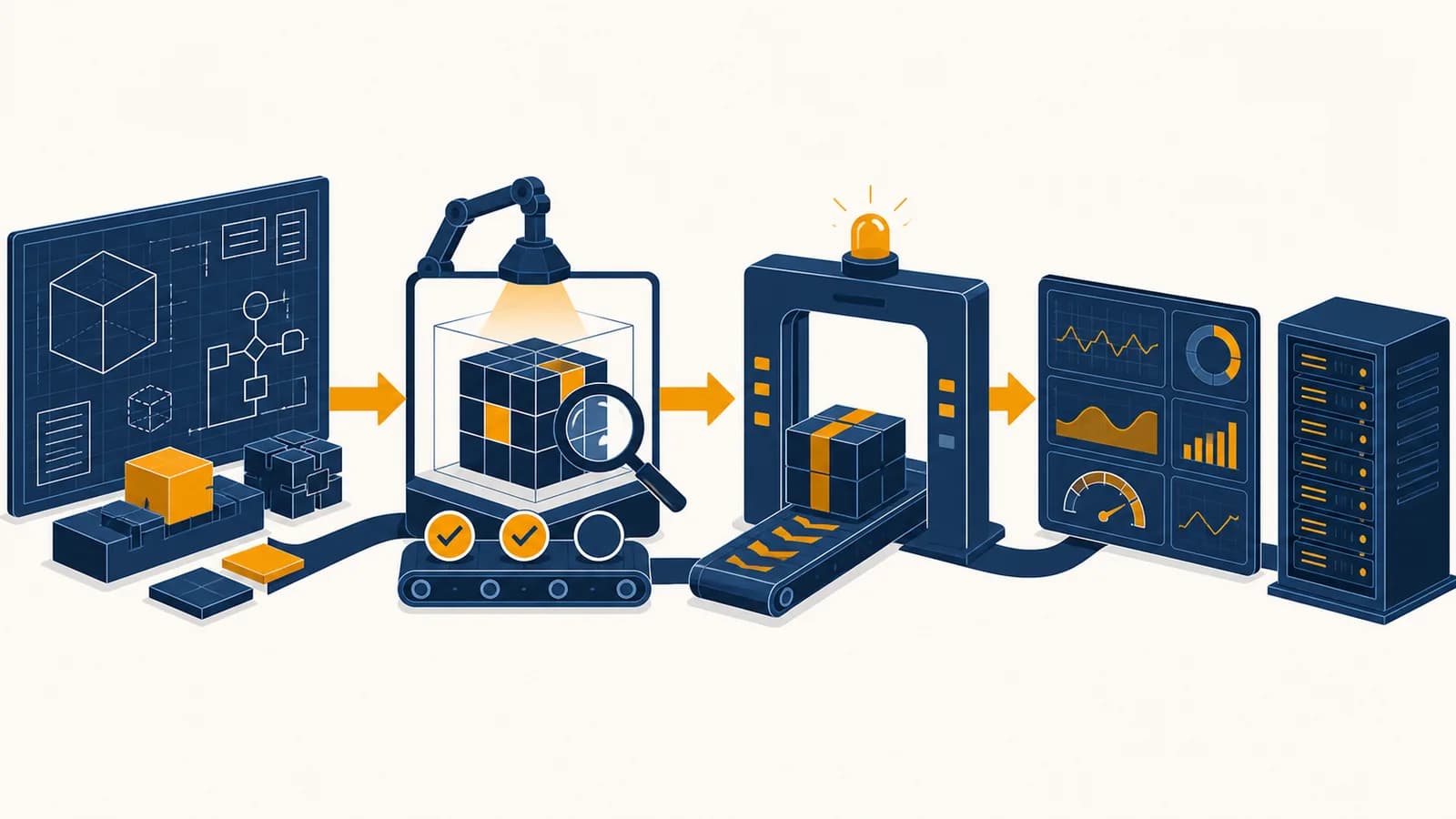
Software engineering is a disciplined process that turns software ideas into dependable systems, in the context of building, releasing, and maintaining computer programs for real users. A software engineering process covers requirements, system design, coding, testing, deployment, monitoring, and maintenance. It exists because a working prototype can prove an idea, but only careful engineering can keep that idea correct, secure, understandable, and available as users, traffic, data, and teams change.
A weather app may look finished once it displays a forecast on its creator's phone. Production changes the problem. The app must handle lost connections, reject malformed data, protect account details, work on supported devices, recover from failed updates, and tell its operators when something breaks. Those obligations are the difference between code that demonstrates a possibility and software that people can depend on.
What software engineering actually is
Software engineering is the controlled design and operation of software under real constraints. It combines programming with requirements, architecture, testing, release management, security, observation, and maintenance so that a system remains useful after the first successful run.
Programming is the act of expressing instructions in code. Software engineering includes programming, but asks a larger set of questions. What should the program do? What must it never do? How will several developers change it without overwriting one another? How will an operator detect failure? How can a future developer understand a decision that is no longer obvious?
The happy path succeeds with the creator's sample input, on the creator's machine, while the creator is present to fix problems.
Expected inputs succeed, invalid inputs fail safely, changes are reviewed, releases can be traced, and operators can diagnose trouble without guessing.
The difference is responsibility over time. Source code is only one part of a production system. Configuration selects behavior for each environment. Databases preserve state. Build tools turn source files into deployable artifacts. Tests check selected properties. Logs and metrics report what the running system is doing. Documentation records interfaces and operating procedures.
The work also includes tradeoffs. A team might accept slower search results to gain simpler code and fewer failure modes. It might delay a feature until account recovery is safe. No design maximizes speed, cost, reliability, privacy, and ease of change at once. Engineering makes those choices explicit, then checks the consequences.
This perspective connects algorithms and data structures to organizations, users, and machines. The broader set of ideas appears across the rest of the computer science guides, including how computers represent information and how programs control computation.
How a prototype becomes production software
A prototype becomes production software through repeated risk reduction. The team defines observable behavior, identifies likely failures, separates components, tests important paths, packages a repeatable release, deploys gradually, watches the result, and uses evidence from operation to guide the next change.
The arrows do not describe a one-way factory line. Evidence can send work backward. A test may expose an unclear requirement. A deployment may show that a design uses too much memory. User behavior may reveal that the original need was misunderstood. Short feedback loops make correction cheaper because less new work depends on a mistaken assumption.
Turn a vague request such as “make checkout faster” into observable outcomes, limits, and failure behavior. Define which users and operations are in scope.
List what can lose data, expose private information, block a release, confuse a user, or overload a dependency. Give the most damaging and likely risks attention first.
Choose component boundaries, data formats, interfaces, storage, and failure handling. Record consequential choices so another developer can challenge or reuse the reasoning.
Implement one end-to-end path that can be reviewed and tested. Small changes reduce the amount of code that could explain a new failure.
Check individual functions, component interactions, and a few important user flows. Review the code and inspect security, accessibility, and performance where they affect the change.
Deploy through an automated process, limit initial exposure when possible, and prepare a rollback or feature switch before trouble occurs.
Compare errors, latency, resource use, and user outcomes with the expected baseline. Keep, revise, or reverse the change based on evidence.
Consider a school lunch ordering prototype. Its first version stores orders in memory and clears them when the process restarts. Production work adds persistent storage, rules for duplicate orders, authentication, a cutoff time based on a single agreed clock, an audit trail for changes, and a recovery plan if payment confirmation arrives late. The visible button may stay the same while most of the engineering happens behind it.
Prototype versus production system
A prototype optimizes for learning quickly, while a production system optimizes for continued service within stated limits. Both can contain good code, but they make different promises about data, errors, security, scale, support, and the cost of future change.
| Concern | Prototype | Production system |
|---|---|---|
| Primary goal | Test an idea or interaction | Deliver an agreed service repeatedly |
| Inputs | Known examples may be enough | Invalid, missing, duplicated, and hostile inputs need defined handling |
| Data | Temporary or replaceable | Protected by validation, access control, backup, and recovery procedures |
| Failure | The creator can inspect it directly | The system reports context, limits damage, and supports recovery |
| Release | Manual steps may be acceptable | Repeatable builds and recorded deployments reduce variation |
| Change | One person may know the whole design | Interfaces, reviews, tests, and documentation share knowledge |
“Production-ready” is therefore not a universal badge. A personal timer and a hospital medication system face different consequences. The appropriate controls depend on harm, exposure, reversibility, legal duties, and service expectations. A low-risk tool can reasonably use a simpler process. Higher stakes demand stronger evidence and more independent checks.
A demo can hide its hardest dependency. A chatbot may appear complete while a person secretly corrects responses, a script supplies clean sample data, or one developer restarts the server after each failure. Production planning must identify every hidden manual step.
Prototype code does not always need to be discarded. A team can keep parts whose behavior is understood, tests can protect, and structure supports the next requirement. The danger lies in promoting assumptions without examining them. An in-memory list is not wrong in a demonstration. It becomes wrong when users reasonably expect their saved work to survive a restart.
Different product surfaces expose different production constraints. A browser service must account for frontend and server interaction, as explained in how frontend, backend, and web infrastructure fit together. Installed applications also face device permissions, interrupted updates, and old client versions.
How version control and code review work
Version control records named snapshots and relationships between changes, while code review lets another person inspect a proposed change before integration. Together they make authorship, reasoning, conflicts, and release contents traceable without relying on one shared folder or human memory.
In Git, a commit identifies a snapshot of tracked files plus metadata and parent history. A branch is a movable name pointing to a commit. A developer creates a branch, makes focused commits, then proposes merging that history into the main line. If both histories changed the same region incompatibly, a person resolves the conflict by deciding what the final code should mean.
Mina changes a delivery fee calculation. Her pull request shows the old and new lines, adds examples at the free-delivery boundary, and explains the business rule. A reviewer notices that refunds reuse the same function with negative amounts. They agree on separate handling before the change reaches customers.
A useful review checks behavior, readability, tests, security implications, and compatibility. It is not a hunt for personal mistakes. The reviewer asks whether the change does what its description claims, whether names reveal intent, whether failure paths are handled, and whether the design makes later work needlessly difficult. Automated formatters and static checks should handle mechanical rules so human attention can focus on meaning.
Small changes are easier to reason about because the reviewer holds fewer interacting facts at once. They are also easier to revert. This does not mean splitting one behavioral change across arbitrary fragments. Each proposed change should be coherent: its code, tests, migration, and explanation should tell one complete story.
How tests and continuous integration work
Software tests execute selected behavior and compare the observed result with an expected result. Continuous integration runs automated checks on proposed changes in a consistent environment, giving the team fast evidence about regressions before those changes join the main code line.
A unit test might call a tax function with known inputs. An integration test might start the service and a database, then check that a saved order can be read back. An end-to-end test might use a browser to place an order through the same visible controls as a user. These tests overlap, but they expose different faults and have different costs.
If a service is scheduled for 1,000 minutes and unavailable for 5, the measured availability for that window is .
This calculation is useful only after the team defines the terms. Does scheduled maintenance count as unavailable? Does a slow response count? Is the service available if its homepage loads but checkout fails? A test or metric has meaning because of the behavior it represents, not because it produces a green mark or a percentage.
A continuous integration pipeline usually checks out the exact proposed revision, installs locked dependencies, builds the program, runs static analysis, executes tests, and reports a result. A passing pipeline proves only that those checks passed under those conditions. It cannot prove the absence of every defect. Missing cases, inaccurate expectations, timing differences, and failures in external services remain possible.
A test suite is executable evidence, not certainty. Each test supports a specific claim about behavior. Good teams can say what an important test protects and what risks remain outside it.
Suppose a function applies a 10 percent discount to orders of at least $50. Useful boundary examples are $49.99, $50.00, and $50.01, because mistakes often occur where a condition changes. A property test could also generate many nonnegative totals and check that the discounted amount never exceeds the original. The examples check named cases; the property checks a general relation.
How architecture keeps change manageable
Software architecture is the set of consequential structural choices that divide a system into parts and govern their communication. Good architecture limits how far a change spreads, makes ownership visible, and matches system complexity to actual operating needs.
A lunch ordering service might separate identity, menu, ordering, and payment responsibilities. The ordering part should not read another component's private database tables merely because that is convenient today. It can use an interface that states what information is available and what failures callers must handle. The boundary creates work now, but gives both sides room to change independently.
Every boundary also creates cost. Messages need formats, failures can occur between parts, and developers must trace behavior across interfaces. A single deployable application with well-separated modules is often easier to operate than many networked services. Splitting into services becomes sensible when independent scaling, release schedules, security boundaries, or team ownership justify the added coordination.
Data design is part of architecture. A schema states what records exist and how they relate. A migration changes that schema while existing data and old application versions may still be present. Safe migrations often expand first, by adding a compatible field, then move data and application behavior, and only later remove the old field. This order prevents a release from demanding a database state that does not yet exist everywhere.
User interface decisions also shape technical boundaries. The methods used to turn research and constraints into usable interactions appear in the guide to UI and UX decisions in working products. A technically correct endpoint still fails its purpose if the interface causes people to submit the wrong action.
How software shows up in production operations
Production operations are the practices that keep released software observable, recoverable, and within agreed service limits. Operators use deployments, configuration, logs, metrics, traces, alerts, capacity controls, backups, and incident procedures to manage behavior that tests alone cannot predict.
A deployment moves a specific build into an environment. The build should be identifiable, and environment-specific settings should be supplied as configuration rather than hidden edits to source code. Secrets such as database passwords require restricted storage and controlled access. They should not be committed to a repository or printed in logs.
These signals answer different questions. A metric can reveal a sudden increase in errors. A trace can show that requests spend most of their time waiting on the inventory service. A log can provide the error category and affected operation. Useful telemetry includes identifiers that connect these views while excluding passwords, access tokens, and unnecessary personal data.
Alerts should correspond to action. If a message wakes someone but gives no useful decision, it creates noise. Teams commonly watch user-visible symptoms such as failed requests and excessive latency, then use internal measurements to diagnose them. Thresholds depend on the service. A delayed photo upload and a delayed emergency message do not carry the same consequence.
A new menu release makes some orders fail. The on-call engineer confirms that failure began after the deployment, disables the new path with a feature switch, checks that order success returns to its earlier level, and preserves logs for analysis. Later, the team fixes the parser, adds the missing test, and records why the alert worked.
Rollback is not always simple. Code can be restored quickly, but a destructive data migration may be irreversible. External messages may already have been sent. A safe release plan therefore considers backward compatibility, staged exposure, data repair, and feature switches before deployment. Recovery is a design requirement, not an improvisation reserved for emergencies.
Five mistakes people make with production software
Production failures often begin with ordinary assumptions that were never made explicit. Five recurring mistakes are treating the demo as the design, testing only successful paths, coupling deployment to irreversible data changes, collecting signals without decisions, and allowing ownership to remain unclear.
1. Treating the happy path as the whole system
The happy path is the expected sequence in which inputs are valid and dependencies respond. Real systems also receive repeated clicks, expired sessions, empty files, slow networks, unavailable services, and out-of-order messages. Engineers specify which operations may be retried and which must happen exactly once from the user's perspective.
For example, a payment request can time out after the bank accepted it but before the app received confirmation. Blindly repeating the request might charge twice. An idempotency key lets the server recognize a repeated logical operation and return the earlier result instead of creating another charge.
2. Mistaking test coverage for tested meaning
Coverage reports show which code executed during tests, not whether the expectations were correct. A line can execute without its result being checked. High coverage can coexist with missing boundary cases, false assumptions, and untested interactions. Review the claims made by tests, especially around money, permissions, deletion, and recovery.
3. Releasing code and data changes as one irreversible step
An application rollback fails if the old code cannot read the newly changed data. Compatible migrations separate expansion, transition, and cleanup. During transition, both versions may need to understand both formats. Cleanup happens only after observation shows that the old version and old data path are no longer needed.
4. Measuring everything without defining a response
A dashboard full of charts does not create understanding. Start with decisions: release or stop, scale or wait, page an operator or record for later. Select measurements that inform those decisions, define normal ranges from real behavior, and link alerts to a short response procedure.
5. Leaving ownership implicit
A component without an owner ages quietly. Dependencies remain outdated, alerts go unanswered, and callers invent incompatible assumptions. Ownership means a named team maintains the interface, reviews changes, responds to incidents, and communicates planned removal. It does not mean that only that team may contribute.
What does production-ready actually mean?
Production-ready means a specific system has enough evidence, controls, and support to serve its intended users at an accepted level of risk. The judgment depends on consequences and context, so it must be expressed as checkable criteria rather than a vague feeling.
A release checklist might require reviewed code, passing required tests, no known critical security issue, a reversible deployment, documented configuration, useful telemetry, an owner, and a response plan. A data-handling feature may add retention and deletion checks. A public interface may add accessibility and abuse controls. The checklist should reflect failures the team is actually responsible for preventing or containing.
“It worked in staging, so it is ready.” Staging supplies evidence from one environment and one set of tests.
“The release passed required checks, can be disabled independently, exposes error and latency signals, and has a named responder.”
Readiness is temporary. A service that was safe for a small private group may need rate limits, stronger authentication, capacity work, and formal support before public use. A new legal duty or dependency change can alter the required controls even if the application's own code stays unchanged.
How long does production engineering take?
Production engineering takes as long as needed to reduce the system's important risks to an accepted level, which can range from a small addition to extensive redesign. Scope, consequences, existing infrastructure, team knowledge, dependencies, and release constraints determine the work more than code size alone.
A ten-line permission change can demand more care than a large visual refactor because a mistake could expose private records. Conversely, a team with established authentication, deployment, telemetry, and testing can ship a modest feature without rebuilding those capabilities. Estimates should name assumptions and uncertainty, then shrink both through early experiments.
Break the estimate by kinds of work: clarify behavior, change interfaces, migrate data, implement, verify, prepare release, and observe. Include review and waiting on external systems. Track the unknowns separately. A short experiment that tests the slowest dependency may improve an estimate more than another meeting about the complete schedule.
Estimate risk, not just typing time. “Two days if the existing login service supports school accounts, plus a discovery task if it does not” is more useful than a confident total that hides the dependency.
Generated code can shorten some implementation work, but it does not remove the need to understand behavior, licenses, data exposure, tests, or operation. The distinction between quick generation and accountable engineering is examined in how prompt-led coding changes the development loop.
How does a team know a release worked?
A team knows a release worked by comparing explicit technical and user outcomes before and after controlled exposure. Build success and deployment success are intermediate facts; the final evidence is that intended behavior improved without unacceptable errors, delay, resource use, or harm.
Before release, define the expected change and guardrails. If a new search index should reduce response time, the team also watches error rate, empty results, and resource use. It can expose the change to a small portion of traffic, compare behavior, then expand or stop. The method separates “the new code is running” from “the new code is serving its purpose.”
Some effects appear slowly. A memory leak may take hours to surface. A confusing account setting may produce support requests days later. Observation windows should match the mechanism of possible failure. Teams also need a baseline, because a count without normal context cannot show whether a release changed anything.
A successful release can still produce a lesson. Perhaps the rollback took longer than expected, or the metric grouped two user actions that should be separate. Production feedback improves the product and the engineering system that delivers it.
Software engineering turns computer science into dependable systems
Software engineering turns computational ideas into services that can survive change, failure, and shared ownership. It connects algorithms and data to evidence, operating constraints, human decisions, and responsibility for what happens after code leaves a developer's machine.
The most useful habit is to replace “works” with a precise claim. Works for which input? Under what load? With which dependency unavailable? What evidence supports the claim? Who notices if it becomes false? These questions turn vague confidence into a system that can be tested and operated.
The takeaway: Build the smallest complete path you can observe, define its failure behavior, release it with a way back, and let real evidence shape the next change.
Choose a program you use this week and inspect one operation, such as saving a document or resetting a password. Trace its input, stored data, dependencies, failure messages, and recovery path. That exercise reveals the software engineering hidden behind an ordinary click.