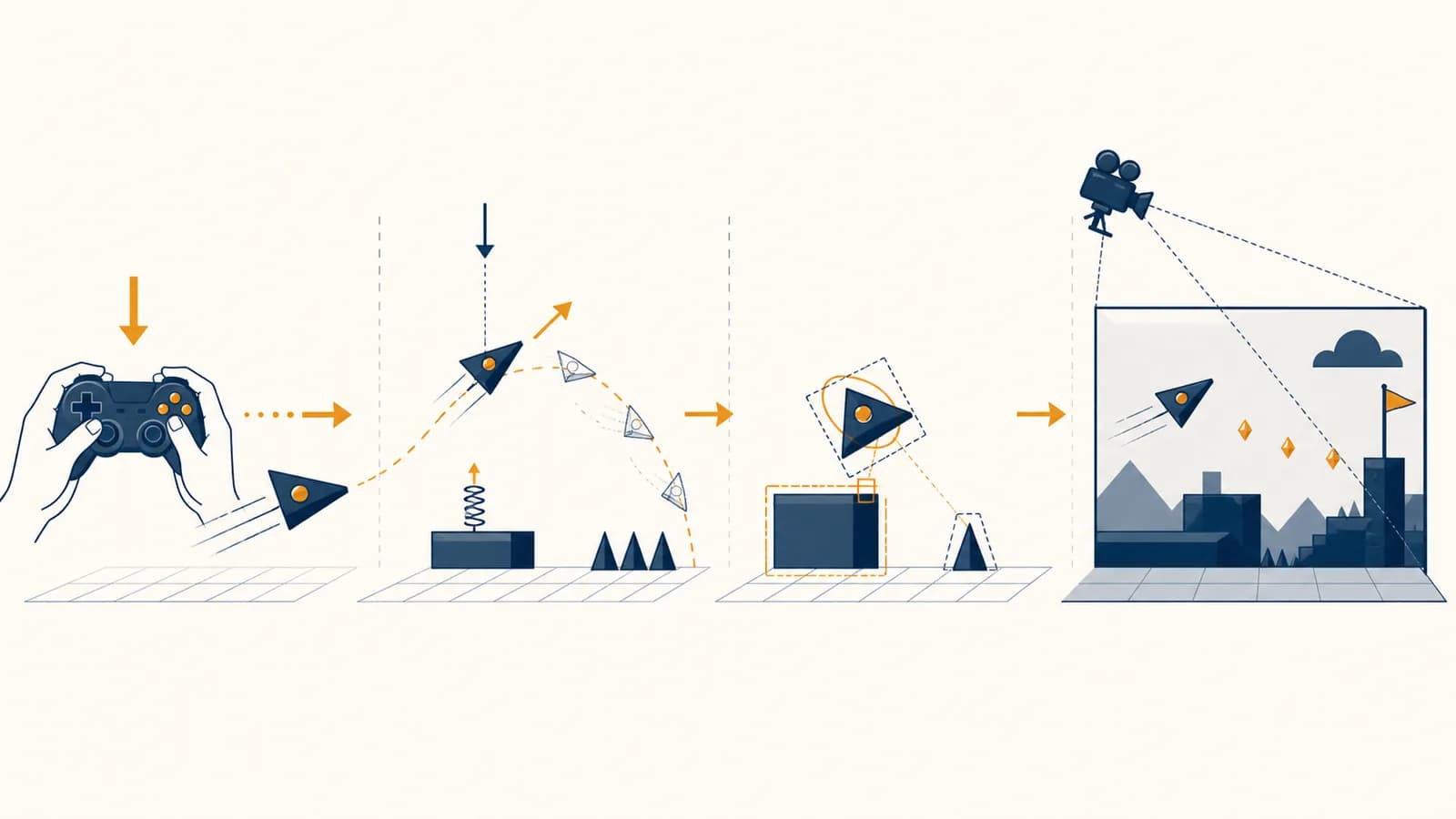
Game development is a software engineering discipline that builds interactive simulations, in the context of video games. Game development combines game physics, computer graphics, and the game loop that repeatedly reads input, updates the world, and draws a frame. These systems exist because a game must turn player actions into visible, consistent results fast enough to feel immediate. Code defines the rules, physics calculates motion and contact, graphics turns data into pixels, and the loop keeps all of it moving in time. A jumping character, a rolling football, and a racing game's rear-view mirror are different features, but they all pass through this same structure.
What game development actually is
Game development is the process of designing and implementing an interactive program whose state changes in response to player input and simulated rules. Unlike a document or ordinary calculation, a game must keep producing new results while the player watches and acts.
A game's state is the collection of facts that describe its current moment: the player's position, an enemy's health, which doors are open, how fast a ball is moving, and the current score. Development means writing systems that change that state according to explicit rules, then present the result through pictures and sound.
Suppose a player presses the right arrow. The input system records the key. Movement code changes the character's horizontal velocity. Collision code checks whether the new path reaches a wall. Animation code chooses a running pose. The renderer converts the scene into pixels. None of those parts alone is the game. The behavior emerges from their agreement about shared data.
This makes game development a concentrated form of computer science. It uses data structures to store objects, algorithms to find collisions, operating system services to read controllers, linear algebra to position cameras, and software design to keep hundreds of rules manageable. The same habits appear in taking software from a prototype into dependable production, though games put unusual pressure on timing and visual feedback.
A character is three pixels from a ledge when the jump button arrives. The game must decide which input belongs to which update, calculate the jump, resolve contact with the floor, move the camera, and draw the new pose. If those operations happen in the wrong order, the jump may feel late or fail entirely.
How the game loop works
The game loop is a repeating control structure that samples input, advances the simulation, and renders the current state. Each pass creates one opportunity for the world to change and one image for the display, usually continuing until the player quits.
A basic loop can be expressed as four operations:
Read a clock to find how much real time has passed since the previous update.
Record button states, mouse movement, touch events, and messages from the operating system.
Run movement, artificial intelligence, physics, animation, scoring, and other rules in a deliberate order.
Build an image from the updated state, submit drawing work to the graphics processor, and display the finished frame.
Elapsed time matters because computers do not complete every pass in exactly the same duration. If a character moves at 6 metres per second and the update represents 1/60 of a second, its displacement is:
At 6 m/s for 1/60 s, the character moves m.
The loop's order changes behavior. Reading input after physics adds a delay before a button affects motion. Drawing before updating shows the previous state. Removing an object while another system is iterating through the same object list can cause a crash. Real engines often separate the loop into more stages, but the central cycle remains input, update, render, repeat.
A frame is an image, not a unit of simulation. A game can perform several physics updates before drawing once, or draw a new image without advancing physics. Keeping those concepts separate prevents many timing bugs.
What game physics actually is
Game physics is a numerical simulation of motion and contact built to produce believable, controllable behavior in real time. It borrows equations from mechanics, but a game usually values stable results and good play over a perfect model of nature.
A physics system represents bodies with values such as position, velocity, mass, shape, and orientation. During an update, it adds forces, calculates acceleration, changes velocity, predicts new positions, detects overlaps, and corrects collisions. Gravity is commonly stored as a downward acceleration. A jump applies an upward velocity or impulse, after which gravity reduces that upward speed until the character falls.
A 12 N force on a 3 kg body gives an acceleration of 4 m/s² in the force's direction.
Simulation proceeds in small time steps rather than as continuous time. One simple method, semi-implicit Euler integration, updates velocity first and then position:
Starting from rest with acceleration 4 m/s² and a 0.25 s step gives 1 m/s velocity and 0.25 m displacement.
That arithmetic is an approximation. Smaller steps usually follow the intended curve more closely, but they require more calculations. Large steps can skip thin obstacles or add too much energy to a spring. Developers balance accuracy, speed, and control.
The goal is often to predict measured behavior within known assumptions and error bounds.
The goal is repeatable behavior that looks plausible, responds well, and finishes within the update budget.
A platform game may let a character change direction in midair, fall faster than it rises, or remain grounded on a slope through an invisible downward force. Those rules are physically unusual but mechanically useful. The honest description is not that the game has bad physics. It has a designed model with different goals.
How collision detection and response work
Collision detection finds shapes that touch or cross, while collision response changes their motion so the contact follows the game's rules. The first stage asks what hit; the second decides where bodies end up and how their velocities change.
Testing every object against every other object becomes expensive as a scene grows. With objects, an all-pairs check can require roughly comparisons. One hundred objects produce 4,950 possible pairs. Most are far apart and cannot collide.
Engines therefore use a broad phase to reject distant pairs. A grid can place nearby objects in the same cells. A bounding volume hierarchy can group objects inside larger boxes. The narrow phase then runs a more exact test on the remaining candidates, such as circle against circle, box against box, or a triangle mesh test.
For two circles, detection is direct. Let their centres be and , with radii and . They overlap when the squared centre distance is no greater than the squared sum of the radii:
Centres 3 units apart with radii 1 and 2 just touch because .
Response starts with a contact normal, a direction pointing away from the surface. The solver can move overlapping bodies apart and apply an impulse that changes velocity along that normal. Restitution controls how much separating speed remains after impact. Friction changes motion along the surface. A trigger zone is different: it reports the overlap, perhaps to open a door, without pushing the body away.
What real-time graphics actually are
Real-time graphics are images generated from a changing scene quickly enough to respond to input. The program describes geometry, materials, lights, and a camera; the graphics pipeline transforms that data and calculates the color of pixels visible in each frame.
A 3D model is commonly made of vertices connected into triangles. Each vertex can carry a position, surface direction, color, and texture coordinates. A texture is an image sampled across a surface. A material is a set of instructions and parameters that determines how the surface reacts to light.
The scene is not stored as a finished picture. It is stored as data. Moving the camera changes which triangles are visible and where they land on screen. Moving a light changes the calculated brightness. Animation changes vertex positions or the transforms of a model's bones. The renderer builds a fresh projection from the current state.
The mesh supplies the car's shape. A red base color gives the paint its pigment. Surface normals tell the lighting calculation which way each part faces. Roughness controls how broad the reflected highlight appears. The camera and nearby lights determine the final pixels. “Shiny red” is therefore a calculation, not one stored color.
Two mathematical ideas appear constantly. A vector represents a direction or displacement. A matrix can represent a transformation such as rotation, scale, or translation. Multiplying transformations lets the game move a wheel relative to a car, then move the entire car through the world.
Games usually build 3D scenes from triangles. Three points always define a flat plane, which makes triangles predictable to transform, clip, and rasterize in graphics hardware.
How the rendering pipeline works
The rendering pipeline converts scene data into a screen image by transforming vertices, removing invisible geometry, turning surviving triangles into pixel candidates, shading those candidates, and combining the results in a frame buffer for display.
The exact pipeline depends on the engine and hardware, but a conventional rasterized frame follows a recognizable sequence:
The CPU organizes scene data and sends drawing commands, meshes, textures, and parameters to the GPU.
A vertex shader moves model coordinates into world, camera, and clip coordinates using matrices.
Geometry outside the camera view is removed or clipped. Surviving triangles generate fragments at covered pixel locations.
A fragment shader samples textures and evaluates material and lighting rules to produce colors and other values.
Depth testing keeps nearer surfaces in front. Blending can mix transparent surfaces with pixels already stored.
Post-processing may adjust the completed image before the display system presents it.
The CPU and GPU have different jobs. The CPU is suited to branching game rules, object management, and issuing commands. The GPU runs similar operations across many vertices or fragments in parallel. Performance suffers if the CPU submits too many tiny drawing jobs, if shaders perform excessive work per fragment, or if large textures exceed available memory and bandwidth.
Visibility is an algorithmic problem as much as an artistic one. Frustum culling rejects objects outside the camera's viewing volume. Occlusion techniques avoid drawing objects hidden behind nearer structures. Level of detail replaces a distant model with a simpler version because its fine geometry would cover too few pixels to see.
Traces paths through a scene to model visibility and light transport. It can produce convincing reflections and shadows, but each additional ray costs work.
Projects triangles onto the image and shades their covered samples. It is efficient and remains a common base for interactive rendering.
Modern renderers can mix both methods. The important distinction is the mechanism, not a claim that one technique always looks better. Art direction, sampling, material design, lighting, and the time available per frame all affect the result.
Fixed timestep versus variable timestep
A fixed timestep advances simulation by the same duration on every update, while a variable timestep uses the elapsed duration of the latest frame. Fixed steps favor repeatable physics; variable steps follow rendering time directly but can make behavior depend on performance.
Consider an object with acceleration. One update of 0.1 seconds does not necessarily produce exactly the same numerical result as two updates of 0.05 seconds, even though both represent the same total time. Integration error depends on step size. Collision detection also sees different intermediate positions. A game that feeds arbitrary frame durations into physics may behave differently during a performance hitch.
A common design accumulates real elapsed time and runs zero or more fixed simulation steps. Rendering happens after the updates. If the fixed step is 1/60 second and 1/30 second of real time has accumulated, the game performs two simulation updates before drawing.
With 1/30 s accumulated and a 1/60 s fixed step, updates.
The renderer can interpolate between the two latest simulation states so motion still looks smooth when drawing at a different rate. This does not change the physics result. It estimates a visual position between confirmed states.
A fixed loop also needs protection against a backlog. If simulating one second takes more than one second of computation, updates accumulate faster than the machine can process them. Games may cap the number of catch-up steps, simplify work, or accept a visible slowdown. Ignoring the backlog can create a spiral in which every late frame causes even more work.
How game development shows up in real work
Game development appears wherever people build interactive worlds, training simulations, visual tools, or responsive entertainment. The work is divided among programmers, artists, designers, audio specialists, producers, and testers, with each role contributing data or rules to the running system.
A gameplay programmer might implement weapons, cameras, character abilities, or enemy behavior. A graphics programmer might write shaders, study GPU captures, and reduce rendering cost. A physics programmer might improve vehicle suspension or collision queries. Tools programmers build editors and import pipelines so other developers can work without changing source code for every asset.
Technical artists sit between visual goals and machine limits. They build materials, rig characters, create procedural tools, and diagnose why an asset renders slowly or incorrectly. Game designers define rules and tune parameters, but they also need enough system knowledge to predict how those rules interact. Testers reproduce failures and record the exact conditions that expose them.
Release targets change the engineering choices. A phone has touch input, battery limits, thermal limits, and many screen shapes. The same constraints are examined in how mobile software handles iOS, Android, and shared code. A console has a stable hardware target. A personal computer release must handle a wider range of processors, graphics cards, drivers, and input devices.
The work also extends beyond entertainment. Driving simulators train responses without placing a learner on a road. Architectural walkthroughs let clients inspect a proposed space. Museums use interactive displays. Film crews use real-time engines to preview sets and camera positions. The software still contains a loop, a changing state, and a renderer, even if there is no score.
Interface decisions are part of the mechanism. A health bar must represent state accurately, remain legible over changing backgrounds, and update without distracting noise. The connection between control, feedback, and human attention is developed further in designing interfaces people can understand and operate.
Four mistakes people make with game systems
Many game bugs come from mixing coordinate spaces, tying simulation to frame rate, detecting contact without defining response, or optimizing without measurement. Each mistake breaks an agreement between systems, so the visible symptom may appear far from the faulty code.
1. Mixing local and world coordinates
Local coordinates describe a point relative to its object or parent, while world coordinates describe it relative to the scene. If a hand socket is stored relative to a character but treated as a world position, an attached sword may float near the origin or move incorrectly as the character turns.
The fix is to name spaces explicitly and transform data at boundaries. A direction also differs from a position: translation affects positions but should not change a direction vector. Camera space, clip space, screen space, and texture space each answer a different “relative to what?” question.
2. Moving a fixed distance per frame
Frame-based movement makes speed depend on how many frames the machine draws. Moving two pixels every frame produces 120 pixels per second at 60 frames per second and 60 pixels per second at 30. Multiplying a speed by elapsed time makes the unit meaningful.
Never hide a unit. “Move by 5” is ambiguous. “Move at 5 metres per second for this timestep” states enough information to check the calculation.
3. Treating collision detection as complete physics
An overlap test reports contact but does not define what happens next. If code only moves two bodies apart, their velocities may still point into each other, causing repeated jitter. If it only reverses velocity, they may remain embedded. Stable contact often requires position correction, velocity constraints, and careful ordering.
4. Optimizing by intuition alone
Performance work must begin with measurement because the slowest subsystem is often surprising. Reducing triangle count cannot fix a script that searches every object several times per update. Rewriting gameplay code cannot fix a fragment shader that covers the entire screen repeatedly.
A profiler records where CPU time, GPU time, allocations, and waits occur. A useful investigation changes one cause, repeats the same test, and checks the measurement again. Average frame time can hide occasional stalls, so developers also inspect individual slow frames and the events around them.
What a game engine actually provides
A game engine is a reusable software framework that supplies common systems such as rendering, input, audio, physics integration, asset loading, scene management, and editing tools. It removes repeated foundation work, but developers still define the particular game's rules and content.
An engine may import a model from an art tool, convert it into an efficient runtime format, display editable properties, serialize a scene, and load that scene on another machine. Its physics library can answer collision queries, but it does not decide how forgiving a jump should feel. Its renderer can draw transparent particles, but an artist still creates the texture and material.
Building without a general engine can make sense for research, unusual hardware, very small games, or teams that need tight control over a specialized pipeline. Using an engine makes sense when its systems and deployment targets fit the project. The choice is a trade between existing capability, constraints, learning cost, and maintenance.
Frame rate versus refresh rate
Frame rate is how often a program produces images, while refresh rate is how often a display scans out images. They can differ, and their coordination affects latency, tearing, smoothness, and how much useful visual feedback reaches the player.
If the game replaces a displayed image while the monitor is scanning it, the screen can show parts of different frames at once. This is tearing. Vertical synchronization can wait for a display interval before presenting, which prevents tearing but can add waiting. Variable refresh technologies let a compatible display adjust its refresh timing within a supported range to match arriving frames more closely.
Frame time is often more useful for engineering than frames per second because work consumes milliseconds. The relation is:
At 60 frames per second, one frame lasts 1/60 s, or about 16.67 ms. At 30, it lasts about 33.33 ms.
Networked games add another clock. A client can predict its own movement immediately, while the server checks authoritative rules and later sends corrected state. Other players may be rendered slightly in the past so two received snapshots can be interpolated. Prediction improves responsiveness, but correction is needed when the local guess differs from the server's result.
Time passes while input is sampled, simulation runs, the frame is built, and the display scans it out.
Time passes while messages travel, wait for processing, and return. Rendering more often does not remove this delay.
These timings interact, but they are not interchangeable. A high refresh display cannot repair an unstable simulation. A fast simulation cannot force a slow network response to arrive earlier. Clear measurements identify which clock is responsible.
Game development makes computer science visible
Game development makes algorithms, data, hardware, and time visible as behavior on a screen. A small change to update order or coordinate math can alter what a player sees immediately, turning abstract computer science into a system that can be tested by observation.
A useful first project is one moving circle in a bounded window. Store position and velocity. Multiply velocity by elapsed time. Reverse the relevant velocity component at each wall. Then add a second circle, test their distance, and decide what contact should do. Draw both every loop. This compact program exposes state, vectors, integration, collision, rendering, and timing without requiring a large game.
After it works, make the test more demanding. Change the frame rate. Insert a deliberate pause. Increase the ball speed until it crosses a wall in one step. Resize the window. Each failure reveals an assumption that the code did not state. Fixing it teaches more than adding decorative features.
The takeaway: A game is a timed conversation between input, simulation, and graphics. Learn to trace one piece of state through that conversation, and complex scenes become collections of understandable operations.
The wider connections are collected in the rest of the computer science subject guides. In any interactive program, notice what state exists, which rule changes it, which clock controls that change, and how the result reaches a person. Those four observations are a practical way to read both games and software.