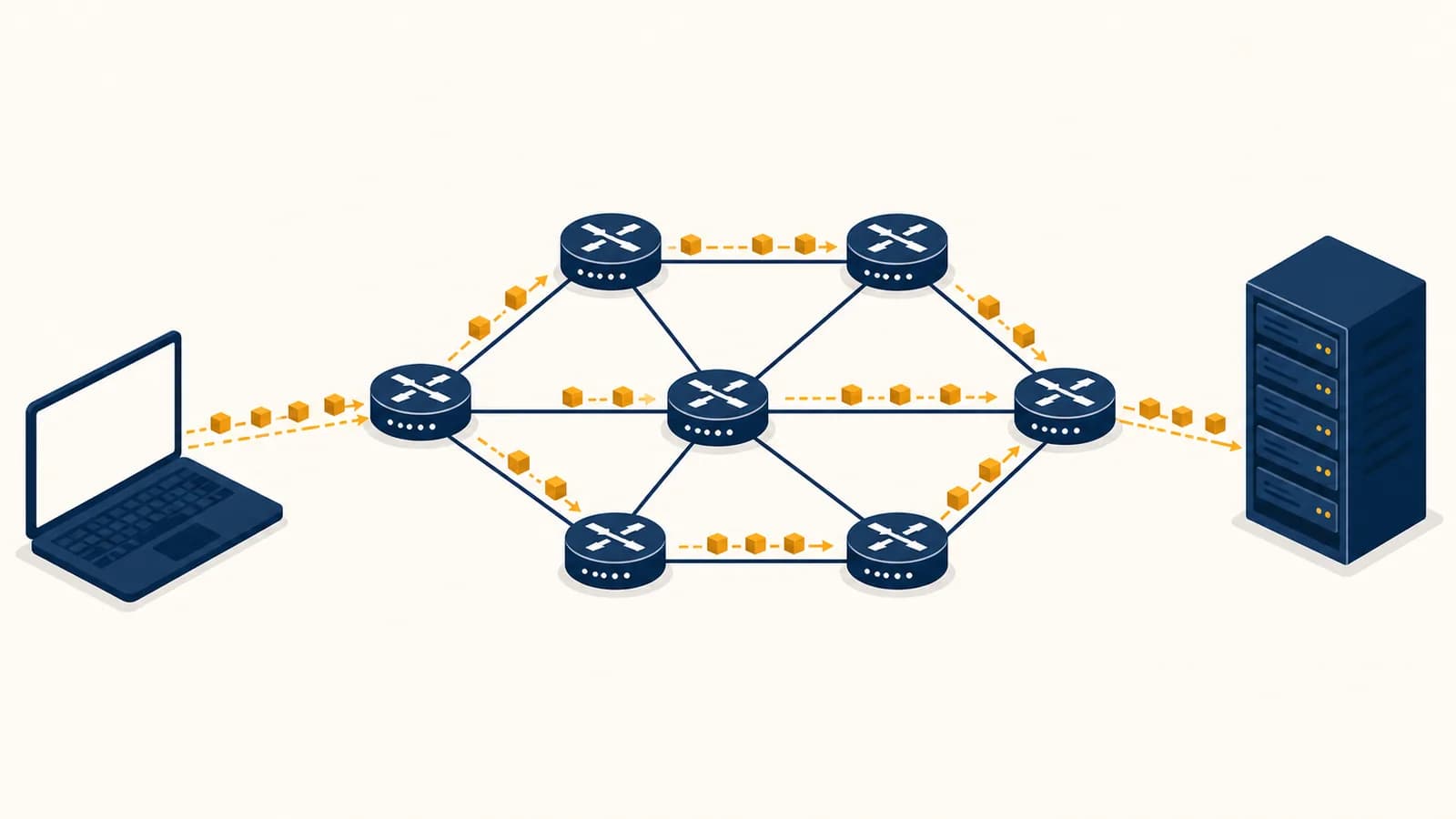
The Internet is a global network of interconnected computer networks that moves digital data between devices, in the context of worldwide electronic communication. To understand how the Internet actually works, follow the path through packets, IP addresses, routers, the Domain Name System, servers, and protocols. These parts exist because no single cable, company, or computer could connect every device reliably. The Internet gives unlike networks a common set of rules, so a phone on Wi-Fi can exchange data with a server across an ocean.
What the Internet actually is
The Internet is infrastructure plus shared rules: physical links carry signals, networking devices forward data, and protocols define how machines identify destinations and exchange messages. It is a network of networks, with independent organizations cooperating rather than one owner controlling the whole system.
The physical layer includes fiber-optic cables, copper wires, cellular radio links, Wi-Fi, data centers, and the routers that join networks. A home network belongs to a household. A school network belongs to a school. An Internet service provider, or ISP, operates a much larger network. Companies, universities, governments, and specialized backbone operators run others. Agreements and technical standards let traffic cross the boundaries between them.
The shared rules are called protocols. Internet Protocol, or IP, handles addressing and packet forwarding. Transmission Control Protocol, or TCP, can provide an ordered, reliable byte stream. User Datagram Protocol, or UDP, sends independent datagrams with less built-in coordination. DNS translates names into information used to reach services. HTTP defines messages used to request and deliver web resources. Each protocol solves a limited problem, and the layers work together.
The Internet is one enormous network run from a central control room.
Thousands of independently operated networks connect at many points and exchange traffic under common protocols.
This decentralized structure lets one network change its equipment without forcing every other network to match. It also creates dependencies. Your traffic may cross several organizations, and a mistake in routing, naming, or access control can affect users far beyond the machine where it began. Studying these boundaries is part of Computer Science because network design joins algorithms, hardware, security, and human agreements.
What packets actually are
A packet is a bounded unit of data sent across a network, containing a payload plus header information that helps devices deliver and interpret it. Large messages are divided into packets so links can be shared and individual pieces can be rerouted or resent.
Suppose a device needs to transfer a photo. It does not reserve every cable between itself and the destination until the entire photo arrives. The networking software breaks the transfer into manageable pieces. Each piece is wrapped with control information. At the Internet layer, that information includes source and destination IP addresses. At other layers, headers may include port numbers, sequence information, and checks used to detect damage.
These nested units reflect layers of responsibility. A web application cares about an HTTP response. TCP may treat that response as bytes to sequence and confirm. IP places transport data inside packets that routers can forward. Ethernet or Wi-Fi places each packet inside a frame suited to one local link. At the next link, the frame can change while the IP packet continues toward its destination.
Packet switching lets many conversations share a link
Packet switching sends small units from many conversations over the same link as capacity becomes available. One packet might belong to a video call, the next to a software download, and the next to a bank request. No conversation needs permanent possession of the cable.
A router may receive packets faster than its outgoing link can transmit them. It briefly stores them in a queue. If the queue fills, it drops packets. That is why congestion can increase delay and cause loss even when every cable is physically intact. End systems and applications respond by slowing down, retransmitting, lowering media quality, or accepting some loss.
A packet is not the whole message. Different packets from one transfer can take different routes, arrive out of order, or fail to arrive. Software at the endpoints decides how to reconstruct or react to the result.
Headers are useful overhead
A header consumes space that cannot carry the application payload, but it makes forwarding possible. If a packet has a payload of 1,200 bytes and combined headers of 60 bytes, the transmitted unit contains 1,260 bytes before any additional link-layer overhead. The visible payload share is therefore . Small packets spend a larger fraction of their capacity on headers, while large packets risk exceeding a link's maximum transmission unit and needing special handling.
How addresses and ports find the right destination
IP addresses identify network interfaces for routing, while port numbers identify the receiving application or service on a device. Routers use address prefixes to move packets between networks, and the destination operating system uses the port to deliver data to the right process.
An IPv4 address contains 32 bits and is commonly written as four decimal numbers, such as 192.0.2.15. IPv6 addresses contain 128 bits and use hexadecimal notation, such as 2001:db8::15. Those example ranges are reserved for documentation, so they can explain addressing without pointing at an ordinary public machine.
An address is not usually a permanent identity for a person or device. A laptop may receive a private address from the home router, then appear to public services under the router's public address. Network Address Translation, or NAT, records which internal conversation matches which external conversation. When the reply returns, the router consults that record and forwards the data to the correct internal device.
Routers match prefixes, not complete travel plans
A router reads a destination IP address and compares it with entries in a forwarding table. Each entry describes a block of addresses as a prefix and points to a next hop or output interface. The router normally chooses the most specific matching prefix, reduces the packet's remaining hop limit, and sends the packet onward.
No ordinary Internet router needs a line for every individual device. Prefixes summarize groups of addresses, much as a postal sorting center can send all mail for one region in the same direction before a local office handles street details. Routers exchange reachability information, including through the Border Gateway Protocol between large networks. Policy matters here. An operator may prefer one route because of cost or business agreements, even if another route looks shorter on a map.
Ports separate services on one machine
A server can handle web traffic, email, and remote administration at one IP address because transport protocols add port numbers. A connection is distinguished using addresses, ports, and protocol information. The operating system keeps track of these conversations and passes incoming data to the process that opened the matching socket. This dispatch is one job of the software explained in how operating systems manage programs and hardware.
How DNS turns a name into an address
The Domain Name System is a distributed naming service that answers questions about domain names, including which IP addresses serve a name. A resolver checks caches and, when necessary, follows referrals through DNS's hierarchy until it obtains an answer or learns that none exists.
People remember lelfy.com more easily than a changing numeric address. Software still needs routing information, so it asks a DNS resolver. That resolver might run on the local network, at an ISP, or as a public service. A cached answer can return immediately. Without one, the resolver performs a sequence of queries.
The device asks for the address records associated with a domain name.
If no cached answer exists, the resolver asks a root server where to find information for the top-level domain.
The resolver asks the appropriate top-level domain server where the domain's authoritative name servers are.
An authoritative server returns the relevant record, such as an IPv4 or IPv6 address, with a cache lifetime.
The resolver gives the answer to the device and can reuse it until its stated lifetime expires.
DNS does more than map one name directly to one address. Records can identify mail servers, delegate authority, attach verification text, or make one name an alias of another. Large services can return different addresses based on service design and network conditions. This flexibility also explains why a DNS change may appear gradual: resolvers can legally keep an older cached answer until its time to live ends.
A site moves to a new server. Its operator changes the authoritative DNS record, but one visitor still reaches the previous address because a resolver cached it earlier. The visitor and site are both working as configured. The old cache entry simply has not expired.
A DNS answer locates a service, but it does not prove that the service is trustworthy and it does not carry the web page itself. Security extensions can authenticate DNS data in deployments that validate them. The browser still uses other protocols, especially TLS, to authenticate an HTTPS service and protect the connection.
How a web request crosses the Internet
A web request crosses the Internet through a chain of separate operations: the device joins a local network, DNS supplies an address, a transport connection is prepared, routers forward packets, and a server returns an HTTP response that the browser interprets and displays.
Imagine typing https://example.com/lesson into a browser. The browser parses the URL. The scheme, https, says to use HTTP protected by TLS. The host is example.com, and /lesson is the path requested from that host. The browser may first check local caches or reuse an existing connection. If it needs a new one, the sequence below begins.
Wi-Fi or Ethernet carries frames to the local router. The device learned network settings when it joined the network.
The browser or operating system obtains an address unless a usable answer is already cached.
Depending on the HTTP version, the browser uses TCP with TLS or QUIC, which combines secure transport functions over UDP.
The request names a method, target, and headers. The response carries a status, headers, and usually content.
HTML can trigger more requests for style sheets, scripts, fonts, images, and data before the screen settles.
At each router, the packet is received on one interface, inspected enough to choose an output, and transmitted on the next link. The router is not normally reading the protected HTTP contents. With HTTPS, TLS encrypts application data between the client and the endpoint that terminates TLS. Observers along the route can still see some metadata, including packet timing and addressing needed for delivery.
The server may be a chain of machines
The destination address may lead first to a content delivery network, reverse proxy, or load balancer rather than the program that creates the final response. That front system can serve a cached file, reject abusive traffic, or pass the request to an application server. The application may then query storage, call another service, and assemble a response. The machinery behind how databases store and retrieve application data often sits on this server side of the exchange.
A content delivery network keeps copies of suitable content in many locations. A nearby copy can reduce distance and remove work from the origin server. It does not abolish the Internet path. The device still uses DNS, addressing, routing, transport, and application protocols to reach that copy.
Internet versus World Wide Web
The Internet is the underlying system that moves data among networks, while the World Wide Web is one application built on it, using URLs, HTTP, browsers, and web servers. Email, online games, voice calls, and file synchronization can use the Internet without being web pages.
Networks, links, routers, IP addressing, routing, and transport provide general communication between endpoints.
Browsers and servers exchange linked resources through web standards, mainly URLs, HTTP, HTML, CSS, and JavaScript.
The distinction explains several familiar failures. A device can have working Internet connectivity while one website is unavailable. DNS may resolve and email may work even while a browser has a broken configuration. A web server can return an error although every router delivered every packet correctly. Each symptom points toward a different layer.
The Internet is also distinct from Wi-Fi. Wi-Fi is a family of technologies for a local wireless link. It can connect a laptop to a router that has no Internet service, and Internet access can arrive without Wi-Fi through Ethernet, fiber, cable, or cellular radio. The Wi-Fi icon therefore proves a local wireless connection, not successful reachability to every online service.
How reliability and security work
Internet reliability comes from detection, retransmission, duplicate handling, routing alternatives, and application design, while security comes from authentication, encryption, integrity checks, updates, and access control. Neither property is automatic: each protocol and system must define which failures and attackers it handles.
TCP makes an unreliable packet service useful
IP offers best-effort delivery. A packet can be lost, duplicated, delayed, or reordered. TCP numbers data, acknowledges received bytes, retransmits when evidence suggests loss, and presents the application with an ordered stream. It also adjusts sending behavior to avoid overwhelming the receiver and to respond to congestion in the network.
Reliability has a cost. Waiting to recover a missing piece may be correct for a document, where every byte matters, but harmful for a live conversation, where a late sound fragment may be useless. Applications using UDP or QUIC can choose recovery rules that fit their data. A live video system might skip an obsolete frame and prioritize newer information.
TLS protects data between authenticated endpoints
TLS, used by HTTPS, lets endpoints negotiate cryptographic keys, check message integrity, and encrypt application data. The browser verifies that the server presents a certificate valid for the requested name and chains to an authority the browser trusts. This helps stop an intermediary from silently reading or altering the protected exchange.
Encryption does not make a site honest. HTTPS can confirm that the connection is protected and tied to the named site. A fraudulent site can still use HTTPS, collect information willingly entered there, or serve harmful content.
Security boundaries remain visible. An HTTPS request protects its content in transit to the TLS endpoint, but the service itself can process what it receives. Malware on the device may read information before encryption. A reused password can be stolen elsewhere. Security therefore includes endpoint protection, careful authorization, safe software, and sensible decisions by people, not only encrypted cables.
Redundancy helps only when failures are independent
Multiple links, DNS servers, and data centers can keep a service available after one component fails. Yet two apparent backups may share the same power supply, physical cable route, configuration system, or provider. A single error can then disable both. Engineers test failure paths and inspect hidden dependencies instead of counting copies.
How the Internet shows up in work and daily decisions
Internet mechanisms appear whenever people diagnose a slow call, publish a site, secure an account, design an app, investigate an outage, or choose where data is processed. Knowing the layers turns a vague complaint into a testable question about names, routes, transport, or services.
Network and site reliability work follows evidence
A network technician checks whether a device has a local address, can reach its gateway, can resolve a name, and can exchange traffic with the destination. A site reliability engineer examines request rates, errors, latency, server health, and dependencies. Both avoid treating every failure as “the Internet being down.” They locate the first broken boundary.
A laptop opens sites by IP address but not by domain name. The local Wi-Fi and some routing clearly work. The sharper hypothesis is a DNS failure, blocked DNS traffic, or a bad resolver setting. Restarting every server on the destination site would target the wrong layer.
Developers make related choices. They set timeouts because replies can be delayed forever from the application's perspective. They design retries carefully because a repeated request might charge a card twice or create duplicate records. They cache stable content, place services near users, validate input, and log enough context to connect an error with the responsible request.
News about outages often describes a control failure
A large outage may begin with a configuration change that withdraws routes, a DNS error that makes healthy servers hard to find, an expired certificate, or overloaded application dependencies. Physical damage is only one possibility. Reports make more sense when you ask which layer failed and which systems depended on it.
The phrase “in the cloud” also refers to physical computers reached through these same mechanisms. Cloud providers rent computing, storage, networking, and managed services in data centers. Their scale changes who operates the machines, not the need for machines. The sibling explanation of what cloud computing places on someone else's infrastructure follows that ownership boundary further.
Privacy decisions depend on endpoints and metadata
Before sending sensitive information, identify who operates the destination, what the service stores, and which endpoint terminates encryption. A virtual private network, or VPN, encrypts traffic between a device and the VPN endpoint. It can hide some traffic details from the local network, but the VPN operator becomes a party able to observe connection metadata and, for unencrypted applications, content. Trust moves. It does not disappear.
Four mistakes people make with Internet connections
Common Internet mistakes come from collapsing several layers into one: people equate Wi-Fi with Internet access, treat bandwidth as total speed, assume packets follow a fixed route, or read encryption as proof of honesty. Each shortcut hides a different cause of failure.
1. “The Wi-Fi bars mean the Internet is working”
Signal bars describe the radio link between a device and a nearby access point. The router's upstream connection, DNS service, route, or destination can still fail. Test the chain in order: local link, gateway, name resolution, remote reachability, then the application.
2. “More bandwidth always makes a response feel instant”
Bandwidth is the rate at which a path can carry data. Latency is the time data takes to travel and be processed. A wider pipe speeds a large transfer, but a small request may be dominated by propagation, queueing, connection setup, and server work. Extra bandwidth cannot remove all of those delays.
3. “Packets have one fixed route”
Routing changes as networks fail, recover, alter policy, or learn new reachability information. Packets in one conversation often follow a stable route for a while, but the architecture does not promise one permanent path. Return traffic can also follow a different route from outgoing traffic.
4. “A padlock means the site is safe”
A browser's HTTPS indicator concerns the connection and the named endpoint. It does not certify truthful claims, fair prices, safe downloads, or responsible data handling. Check the domain name, the requested action, and the operator's legitimacy as separate questions.
This diagnostic habit also prevents accidental fixes. Changing five settings at once may hide the cause and introduce a second fault. One controlled test at a time produces evidence that another person can reproduce.
What happens when the Internet connection drops?
When a connection drops, applications lose the ability to exchange new packets across the failed path, but local computation and cached data can continue. Software may queue work, retry with limits, choose another interface, or report an error based on its design.
The phrase “offline” covers several conditions. A phone may lose Wi-Fi but switch to cellular service. A router may keep the home network working while its ISP link fails. A single route may break while other destinations remain reachable. A browser may display a cached page that looks online even though it cannot refresh.
Good offline-capable software records local changes and synchronizes later. That creates a data problem: the same item might be edited on two devices before they reconnect. The program needs a conflict rule, such as accepting the latest recorded version, merging nonconflicting fields, or asking a person to choose. Networking can deliver both versions, but it cannot decide what the user's intent was.
How mobile Internet differs from home Internet
Mobile and home Internet use the same Internet protocols beyond their access networks, but they connect devices through different local technologies, addressing systems, mobility controls, and provider infrastructure. A moving phone can change radio cells while applications try to keep conversations usable.
A home device usually reaches a nearby router through Wi-Fi or Ethernet, then travels through a fixed broadband connection. A mobile device uses licensed radio spectrum to reach cellular equipment. The carrier authenticates the subscription, manages radio resources, and carries traffic into its packet network before reaching other networks.
Movement, interference, building materials, radio congestion, and power limits make the access link variable. Phones also switch between Wi-Fi and cellular interfaces. An IP address or route may change during that switch. Applications that reconnect cleanly, resume transfers, and avoid assuming a permanent address cope better than those built around a perfectly stable path.
How bandwidth, latency, and throughput differ
Bandwidth is a path's theoretical or configured data-carrying rate, latency is the delay for data to travel and receive a response, and throughput is the useful rate an application actually achieves. Congestion, loss, protocol overhead, server limits, and shared links separate these measurements.
At a steady 20 megabits per second, an 80 megabit file needs at least seconds, before setup, contention, and protocol overhead.
The formula gives a lower bound when the stated rate is sustained. Real transfers may start slowly, share a bottleneck, lose packets, or wait on storage and computation. Units also cause mistakes: network rates are commonly expressed in bits per second, while file sizes are often displayed in bytes. Eight bits make one byte, before considering naming conventions and overhead.
Latency matters when an application needs several dependent exchanges. If the next request cannot begin until the previous answer arrives, each round trip adds waiting. Protocol designers reduce this cost by reusing connections, combining setup, allowing multiple requests in flight, and placing copies of content nearer to users.
The takeaway: Measure the operation that feels slow. A large download points toward throughput, an interactive control may expose latency, and a failure for one name may point toward DNS rather than link capacity.
The Internet is a stack of testable agreements
The Internet works because independent hardware and software follow compatible agreements at each layer. Packets, addresses, routes, names, transport rules, encryption, and applications each solve a defined problem, so failures can be isolated and systems can change without replacing everything.
The most useful way to observe the Internet is to follow one action. Load a page and identify the URL, DNS lookup, destination address, transport, encrypted session, HTTP request, server work, and returned resources. Then change one condition, such as disabling Wi-Fi or entering a nonexistent domain, and notice which stage fails.
This habit connects networking to the rest of computing. Binary representations encode every address and packet field. Operating systems schedule the programs that send and receive. Algorithms select routes and manage congestion. Databases answer server queries. Security rules decide who may act. The Internet is not a mysterious cloud around computer science. It is computer science made visible as many machines cooperate under precise, inspectable rules.