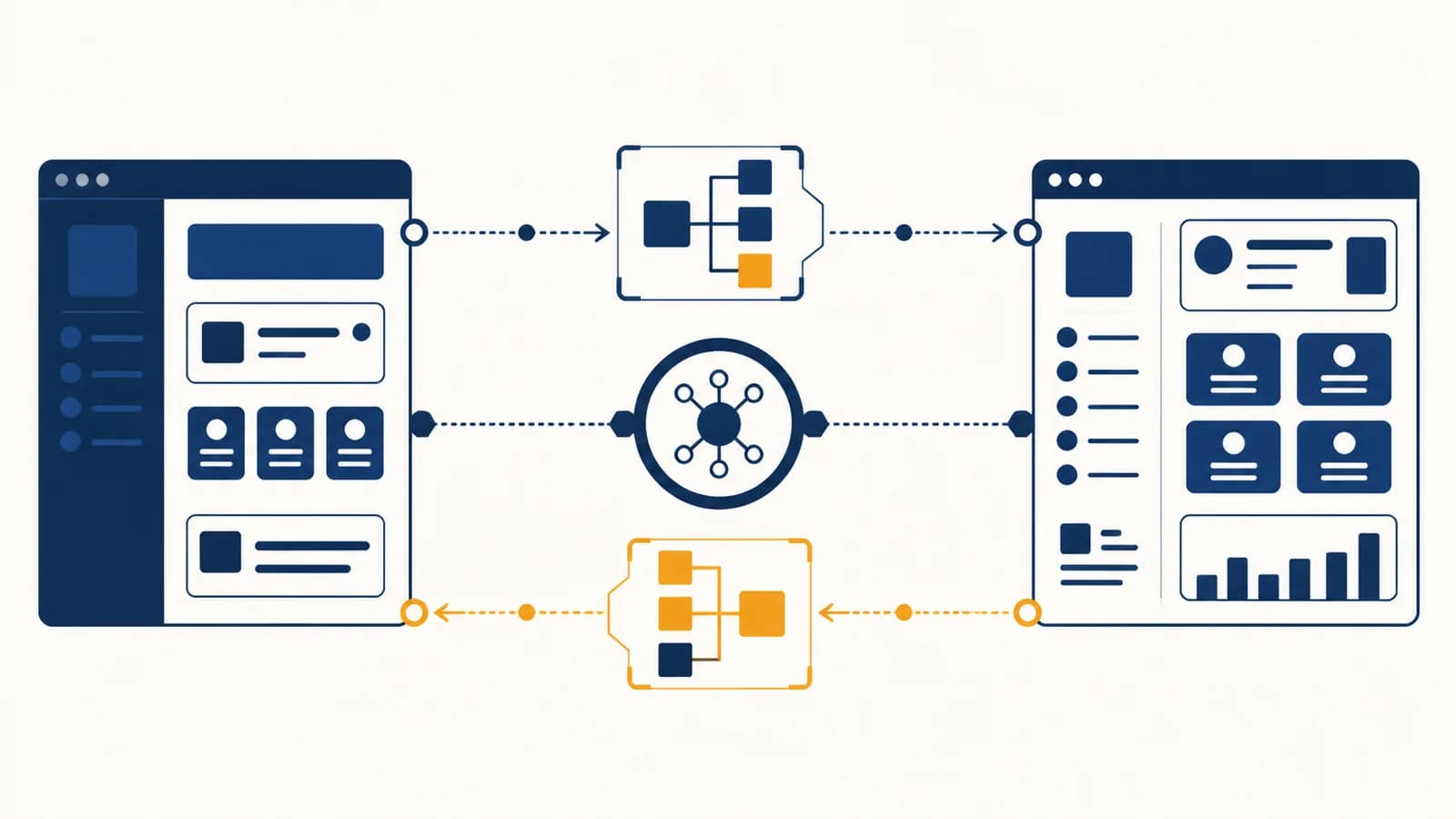
API is an interface that lets one piece of software request data or actions from another, in the context of computer systems. The abbreviation means application programming interface. An API defines what requests are allowed, what information each request must contain, and what response comes back. Web APIs often use HTTP requests, URLs, JSON data, status codes, and API keys. They exist so programs can cooperate without knowing each other's internal code.
What an API actually is
An API is a published contract between software components. It names the operations a provider offers, specifies the inputs each operation accepts, and describes the outputs or errors a caller can expect, while keeping the provider's implementation hidden.
Imagine a weather app that displays tomorrow's forecast. The app does not need its own satellites, sensor network, or atmospheric model. It sends a request to a weather service's API. The service checks the request, runs its own code, and returns structured forecast data. The app then turns that data into icons and temperatures on the screen.
Chooses what the person sees, gathers input, sends a request, and presents the result.
Defines permitted operations, checks the request, accesses its data or service, and returns a documented response.
The contract is the important part. A restaurant menu is a useful comparison, as long as the comparison is kept precise. The menu lists operations you may request and the information needed to order them. It does not expose the kitchen's storage plan or cooking schedule. In software, documentation plays the role of the menu, while code on the provider's side performs the work.
APIs are not limited to the web. An operating system offers APIs for opening files, drawing windows, and using a camera. A programming language's standard library offers APIs for sorting lists or working with dates. A database driver offers an API for sending queries. The common idea is a boundary with stated rules.
An API is a contract, not a database. The API may read a database, calculate a result, operate a device, send a message, or combine several services. The caller only sees the operations the contract exposes.
How a web API request works
A web API call follows a request and response cycle. A client builds an HTTP request, the network carries it to a server, the server routes and processes it, and an HTTP response returns a status, headers, and usually data.
Suppose a school events app requests the event whose identifier is 42. Its client might send this simplified request:
GET /events/42 HTTP/1.1
Host: api.example.org
Accept: application/json
Authorization: Bearer <token>
Each line has a job. GET is the HTTP method. /events/42 is the path to a resource. The host identifies the server. The Accept header asks for JSON. The authorization header carries a credential. HTTPS encrypts the request while it travels, so observers on the network cannot simply read the path, headers, or body.
The client selects a method and URL, adds headers, and includes a body when the operation needs one.
DNS helps locate the host, a connection is made, and HTTPS protects data in transit.
The server matches the method and path to code, checks credentials, and rejects missing or invalid input.
Server code may read storage, calculate a value, call another API, or queue work.
The response carries a status code, headers, and possibly a body. Client code branches according to that result.
A successful response could look like this:
HTTP/1.1 200 OK
Content-Type: application/json

{
  "id": 42,
  "title": "Robotics club",
  "startsAt": "2026-09-03T15:30:00Z"
}
The server has not sent a finished screen. It has sent facts in a machine-readable shape. The client decides how to display them. This separation allows a website, phone app, and school noticeboard to use the same API while presenting different interfaces. A learner comfortable with browser-side JavaScript and page behavior can use fetch to make this kind of request.
What endpoints, methods, headers, and bodies actually are
An endpoint identifies an available API operation, while the HTTP method states the intended kind of action. Headers carry information about the message, and the body carries the main input or output data when the operation needs it.
An endpoint combines an address with an operation
An endpoint is commonly described by a method and a URL pattern together. GET /books/17 and DELETE /books/17 share a path but request different operations. Treating the URL alone as the endpoint can hide that distinction.
HTTP methods express intent
GET retrieves a representation without asking to change it. POST commonly submits data to create something or start an operation. PUT commonly replaces a resource, PATCH changes part of one, and DELETE asks to remove one. A particular API's documentation remains the authority because real contracts vary.
| Request | Likely purpose | Possible body |
|---|---|---|
GET /books?author=LeGuin | Search for books | Usually none |
GET /books/17 | Retrieve book 17 | Usually none |
POST /books | Create a book record | Title, author, and other fields |
PATCH /books/17 | Change part of book 17 | Only the fields to change |
DELETE /books/17 | Delete book 17 | Usually none |
Query parameters follow the ? in a URL and usually filter, sort, search, or paginate a collection. In /books?author=LeGuin&limit=10, the path names the collection and the query string narrows the request. Path parameters such as 17 usually identify one resource.
Headers describe the message and its context
Headers can state the data format, carry authentication, control caching, identify the calling software, or attach a request identifier for tracing. They are metadata about the exchange. A header is still visible to the receiving server, so moving a secret from the body into a header does not make it harmless to log.
The body carries structured content
A request body might contain a new user's name and email. A response body might contain that user's generated identifier. JSON is common because it maps neatly to strings, numbers, Boolean values, arrays, objects, and null. Other formats include form data, XML, plain text, protocol-specific binary data, images, and audio.
How status codes and errors work
An HTTP status code gives the broad outcome of a request, while the response body can provide specific error details. Client code should use both, handle expected failures deliberately, and avoid treating every received response as successful data.
The first digit defines an HTTP status class. The familiar 200 OK marks success. 201 Created commonly follows successful creation. 204 No Content reports success without a response body. A redirect uses the 3xx class, though API clients often encounter 2xx, 4xx, and 5xx responses most directly.
A 400 Bad Request means the server could not accept the submitted request. 401 Unauthorized usually means valid authentication credentials are missing or rejected, despite the historical wording of its name. 403 Forbidden means the server understood the caller but refuses the operation. 404 Not Found means the requested resource or route was not found. 429 Too Many Requests signals rate limiting. 500 Internal Server Error reports an unexpected failure on the server.
A signup form sends {"email":"not-an-email"}. The API returns 400 with {"error":"invalid_email","field":"email"}. The client can mark the email field and explain the correction. If it ignored the status and assumed a user object, later code would fail for a second, less informative reason.
Network failure is different from an HTTP error. With an HTTP error, the client reached a server and received an HTTP response. With a timeout, DNS failure, or lost connection, it may receive no response at all. Good client code distinguishes these cases, records enough context to diagnose them, and gives the person a useful next action. The habits taught in systematic methods for finding broken behavior apply directly to request logs, response bodies, and reproduction steps.
API versus user interface
A user interface is designed for a person to operate, while an API is designed for software to call. Both expose available actions, but they use different inputs, outputs, error signals, and assumptions about speed and repetition.
A person clicks, taps, reads labels, recognizes pictures, and corrects mistakes from visible messages. Layout and accessibility affect whether the interface works well.
Code sends exactly shaped values and reads structured results. Stable field names, documented types, status codes, and predictable behavior affect whether the interface works well.
A flight booking website may show a date picker and a blue search button. Clicking the button can make JavaScript call a flight-search API with origin, destination, and date fields. The web page is the user interface. The request contract behind it is the API. A different client could call the same API without displaying that button at all.
This distinction also explains why copying what a website does can be unreliable. A public API is intentionally documented for programmatic use. A site's internal requests may change without notice and may depend on browser state, private credentials, or rules that forbid automated access. Visible data is not automatically licensed or authorized for any use.
API versus library
An API is a set of interaction rules, while a library is packaged code that a program can import and run. A library has an API of its own, and it may also act as a convenient client for a remote web API.
Consider Python's json module. Your program calls functions such as json.loads inside its own process. Those function names, parameters, return values, and exceptions form a library API. No internet connection is required to parse the text. By contrast, calling a maps web API sends data to a service running on another machine.
A software development kit, often called an SDK, can wrap network details in familiar language functions. Instead of assembling a URL, authorization header, and JSON body manually, a Python program might call maps.find_route(start, end). The SDK still sends the request underneath. A practical introduction to writing Python programs with reusable modules helps make this distinction concrete.
One service can expose several interfaces. The same provider might publish an HTTP API, an official Python library that calls it, a command line tool, and a web dashboard. They are different doors into related operations.
The term API therefore covers more than remote services. A browser API such as document.querySelector lets JavaScript work with a web page. An operating system API lets a program ask for file access. Hardware drivers translate standard operations into device-specific commands. The boundary may sit across a network, between packages, or between a program and its operating system.
REST versus RPC and GraphQL
REST, RPC, and GraphQL are different ways to shape an API contract. REST organizes interactions around resources and HTTP operations, RPC exposes named procedures, and GraphQL lets a client request selected fields through a typed query system.
REST models addressable resources
A REST-style API might represent customers as /customers and an individual order as /orders/91. HTTP methods express operations on those resources. Strict REST includes architectural constraints beyond tidy URLs, so an HTTP API with resource-shaped paths is not automatically a complete example of the REST architectural style.
RPC models callable actions
Remote procedure call designs name actions such as calculateShipping or approveInvoice. The request supplies parameters and the response supplies a result or error. This can express operations that do not fit naturally as creating, retrieving, updating, or deleting resources.
GraphQL models a typed field graph
GraphQL clients send a query describing fields they want. One query might ask for a student's name and the titles of enrolled courses without requesting every stored field. A schema defines available types, fields, arguments, and relationships. GraphQL uses one query language, but it does not remove the need for authentication, authorization, validation, limits, or careful server code.
| Style | Main shape | Example idea |
|---|---|---|
| REST-style HTTP | Resources, URLs, and HTTP methods | PATCH /orders/91 |
| RPC | Named operations and parameters | approveInvoice(id) |
| GraphQL | Queries against a typed schema | Request selected student fields |
No style wins every design decision. The right choice depends on the operations, client needs, tooling, caching requirements, performance constraints, and team experience. A clear contract with consistent errors and good documentation is more useful than a fashionable label attached carelessly.
How APIs show up in jobs and daily decisions
APIs appear wherever one system needs another system's data or capability. They connect workplace tools, power app features, automate repetitive tasks, operate physical devices, and influence what information people can access or move between services.
A checkout coordinates several independent systems
An online shop may call a catalog service for stock, a tax service for a calculation, a payment processor to authorize money, and a carrier service for shipping options. Each provider owns a separate part of the process. If one call fails, the shop must decide whether to retry, pause the order, or undo earlier work.
The arrows do not mean every call must happen in that exact sequence. Shipping estimates might be fetched earlier, and independent operations might run at the same time. The diagram exposes the dependency that matters: a screen called checkout often coordinates several machines and organizations.
Data analysts and scientists retrieve structured evidence
A researcher can use a public data API to request records by date or location, then analyze the returned data with code. The API makes repeated, precise retrieval possible. It does not guarantee that the dataset is complete, unbiased, current, or suitable for the research question. Those judgments still require source documentation and domain knowledge.
Operations teams automate routine work
A script can create support tickets, update inventory, or post an alert when monitoring detects a failure. The benefit is repeatability. The danger is scale: a faulty loop can make the wrong API call thousands of times. Teams use permissions, dry runs, audit logs, rate limits, and approval steps to contain that risk.
People make choices through API-produced results
Transit times, bank balances, parcel tracking, appointment slots, and translation suggestions often arrive through APIs. A missing result may mean the underlying fact is absent, the request was filtered, permission was denied, or a service failed. Knowing the pipeline helps a person question an interface instead of treating every displayed value as direct reality.
A bus app says no arrival is available. The bus may still be running. Its vehicle may have stopped reporting location, the transit feed may be delayed, or the app's API request may have failed. The displayed absence is evidence about a software response, not certain proof about the road.
5 mistakes people make with APIs
Most early API failures come from misreading the contract, assuming success, mishandling credentials, ignoring limits, or coupling code too tightly to one response shape. Each mistake can be reduced by making the request and its assumptions visible.
1. Guessing the request instead of reading the contract
A path that looks obvious may be wrong, a field may require a particular date format, or a method may have a different meaning in that service. Start with the provider's documentation and one minimal example. Record the exact method, URL, headers, body, and response while testing.
2. Assuming every response means success
Many programming tools return a response object even for 404 or 500. Code must inspect the status before treating the body as expected data. It should also handle an invalid body, an empty body, and a connection failure without hiding the original cause.
3. Shipping a secret inside public client code
Code downloaded by a browser or installed in a mobile app can be inspected. Hiding an API key in a renamed variable or encoded string does not make it private. Sensitive credentials normally belong on a controlled server, with narrow permissions and a plan to rotate them after exposure.
Do not commit live API keys to a repository. Environment variables can keep secrets out of source files, but the surrounding system must also prevent accidental logging, exposure to untrusted code, and excessive permissions.
4. Ignoring pagination, quotas, and rate limits
An API may return only one page of a large result. If a response includes a continuation token or next-page link, stopping after the first call produces incomplete data. Sending too many calls can trigger 429 responses or account limits. Clients should follow documented pagination and pace requests deliberately.
5. Assuming the response shape can never change
Providers fix bugs, add fields, deprecate versions, and sometimes make breaking changes. Clients should ignore harmless extra fields, validate fields they depend on, and keep API-specific mapping code near the boundary. Contract tests can warn a team when an expected field or behavior disappears.
How API keys, tokens, and permissions work
API credentials identify a calling application or user, and authorization rules decide what that identity may do. A key is often a project identifier with secret value, while a token commonly represents a limited session, user, or permission grant.
Authentication answers, “Who is making this request?” Authorization answers, “May that identity perform this operation on this resource?” A signed-in teacher might be authenticated but still forbidden to edit another school's records. Keeping the two decisions separate produces clearer security rules and clearer errors.
Credentials do not make an unsafe request safe by themselves. HTTPS protects credentials in transit. Server-side storage helps keep long-lived secrets out of public clients. Short lifetimes reduce the period in which a stolen token works. Scopes restrict a token to stated abilities, such as reading calendar events without deleting them. The principle of least privilege means granting only the access needed for the task.
How CORS affects browser API calls
Cross-Origin Resource Sharing, or CORS, is a browser-enforced HTTP permission system that lets a server state which other origins may read its responses. It is not a general firewall, and it does not replace authentication or authorization.
An origin is defined by a URL's scheme, host, and port. A page at https://school.example has a different origin from https://api.example. For some cross-origin requests, the browser first sends a preflight OPTIONS request. The API's response headers tell the browser which origins, methods, and headers it allows.
Stop browser page code from reading a disallowed cross-origin response under the browser's same-origin security model.
Prove a user has permission, keep an exposed key secret, or prevent direct calls made outside a browser.
If a command line request succeeds but the same URL fails in browser code with a CORS message, the difference is expected: the browser applies its origin rules. Adding an Access-Control-Allow-Origin header in client JavaScript cannot fix the server's policy. The API server, or a server under the application's control, must return the appropriate response headers.
How webhooks reverse the direction of an API call
A webhook is an HTTP request one system sends to another when an event occurs. Instead of repeatedly asking whether something changed, the receiving application publishes a callback URL and waits for event notifications.
Suppose a video-processing service takes several minutes to finish a file. The client can poll GET /jobs/73 again and again, or it can register a webhook URL. When the job finishes, the service sends an event to that URL. The receiver acknowledges the event quickly and processes it safely.
Webhook delivery can be repeated, delayed, or out of order. A receiver should verify that the event came from the claimed provider, often by checking a cryptographic signature according to that provider's instructions. It should store an event identifier so a duplicate does not repeat the business action. It should also return the documented success response promptly, rather than keeping the connection open through slow work.
APIs turn computer science boundaries into working systems
APIs make abstraction practical: one component can depend on a documented behavior without owning the code behind it. Learning to trace requests, state, failures, and permissions connects programming details to the larger study of Computer Science.
A useful exercise is to open a browser's developer tools on a familiar site and inspect the Network panel. Choose a request that returns JSON. Identify its method, path, status code, request headers, and response body. Then ask which visible part of the page used that response and what the page would do if it returned 404, 429, or no response.
When writing your own client, begin with one small successful call. Change one input and observe the request. Cause a safe error and inspect the response. Remove the credential and compare the result. This turns an invisible exchange into evidence you can reason about.
The takeaway: An API is a precise agreement at a software boundary. Follow one request all the way through, including its failure paths, and the surrounding system becomes much easier to explain, test, and improve.