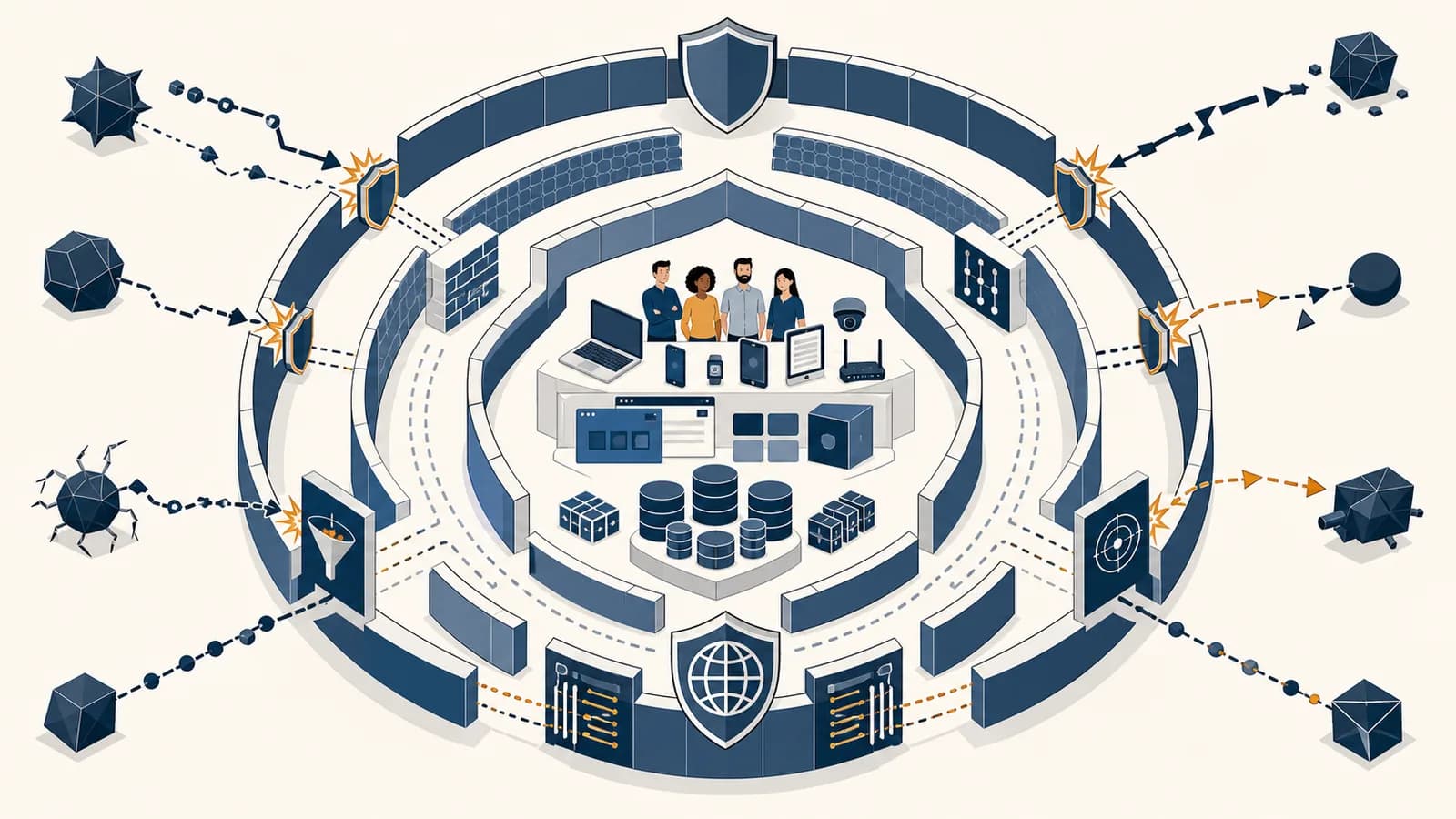
Cybersecurity is a field that protects computer systems, networks, software, data, and people from unauthorized access, damage, disruption, and deception, in the context of digital technology. A useful answer to “what is cybersecurity?” must explain how cybersecurity works through prevention, detection, response, and recovery. Common cybersecurity examples include password checks, encrypted messages, software updates, fraud alerts, access logs, and backups. The field exists because computers act on valuable information, and any system that accepts instructions can also receive dishonest, dangerous, or malformed instructions.
A hospital needs records to be private, correct, and available during treatment. A bank needs to know that a transfer request came from the account holder and was not altered in transit. A teenager needs an account recovery process that will not hand an attacker the keys. These look like different problems, but each asks the same engineering question: what could go wrong, and which controls reduce the chance or cost of that failure?
What cybersecurity actually is
Cybersecurity is the practice of managing risks created when people, devices, programs, and networks exchange information. It protects confidentiality, integrity, and availability while also supporting identity checks, accountability, safe recovery, and decisions about which risks a system can accept.
Confidentiality means information reaches only authorized people or processes. Integrity means data and instructions stay accurate and unaltered except through authorized changes. Availability means the system and its data remain usable when needed. Security practitioners often call these three goals the CIA triad.
Consider an online gradebook. A student reading another student’s marks is a confidentiality failure. An attacker changing a mark is an integrity failure. A flood of traffic that stops teachers opening the gradebook is an availability failure. One incident can damage more than one goal, so security is rarely solved by a single product.
Cybersecurity is also about people and procedures. A perfectly implemented lock is useless if a staff member is tricked into opening it. A secure program can still expose data if an administrator grants broad access to the wrong account. Technical controls, workplace rules, training, and clear responsibility all belong to the same protection system.
Security is risk management, not a promise of zero failure. A control is useful when it reduces the likelihood or impact of a believable threat without making the system unusable.
How threats, vulnerabilities, and controls fit together
A threat is something capable of causing harm, a vulnerability is a weakness that makes harm possible, and a control is a safeguard that changes the risk. Cybersecurity work connects all three to an asset that has value and a consequence if lost.
An asset might be a customer database, a school laptop, a factory controller, a person’s reputation, or the ability to take payments. A threat actor might be a criminal group, a dishonest employee, an automated bot, or a careless user. Storms and equipment failures are threats too, even though they have no hostile intent.
Suppose a small shop stores customer orders in an internet-facing database. The database is the asset. An exposed administrator password is the vulnerability. A criminal searching automatically for exposed databases is the threat actor. Possible controls include restricting network access, replacing the password, requiring a second authentication factor, monitoring unusual queries, and keeping recoverable backups.
Teams often rank risks by combining likelihood and impact. A simple classroom model uses:
If likelihood is rated 4 out of 5 and impact is rated 5 out of 5, the visible score is . The ratings express judgment, not a measured law of nature.
The model helps people compare problems, but it does not make uncertainty disappear. A rare event can deserve attention if its damage would be severe. A common nuisance might deserve a cheap automated control. Good analysis records assumptions, considers who could attack, and revisits the result when the system changes.
How layered defense works
Layered defense uses several independent or partly independent safeguards so that one failure does not expose the whole system. The layers prevent some attacks, detect others, limit an intruder’s movement, preserve evidence, and support recovery after damage has occurred.
Imagine an employee opening a malicious attachment. An email filter may block it. If that fails, the document viewer may isolate active code. If code still runs, application permissions may stop it reading payroll files. Monitoring may flag unusual behavior, network segmentation may contain it, and a backup may restore damaged data.
Remove unused services, close unnecessary network ports, and collect only the data the organization needs.
Apply access rules, secure configuration, updates, input validation, and protective filters.
Record useful events and alert on patterns such as repeated login failures or an account downloading an unusual volume of files.
Disable compromised accounts, isolate affected devices, protect evidence, and keep essential services operating safely.
Restore trusted data, repair the weakness, notify affected parties when required, and test whether the changes work.
Independence matters. Two controls that fail for the same reason do not provide much depth. Storing both a working file and its only backup on the same laptop does not protect against theft, fire, or ransomware on that laptop. Requiring a password and a security question based on public facts may still leave both checks vulnerable to guessing.
Layering also explains why security work includes architecture. Separating a public web server from an internal payroll system reduces the paths an intruder can take. Giving a service account permission to read one folder instead of the whole network limits the damage if its credentials leak. This is the principle of least privilege: each identity receives only the access needed for its current task.
How authentication and authorization work
Authentication tests a claim about identity, while authorization decides what an authenticated identity may do. A secure system keeps those decisions separate, limits repeated guesses, protects recovery routes, records sensitive actions, and withdraws access when a person or device no longer qualifies.
Authentication tests evidence
An identity claim sounds like “I am the owner of this account.” The system asks for evidence based on something the claimant knows, possesses, or is. A password is something known. A hardware security key is something possessed. A fingerprint is a physical characteristic, though biometric systems compare measurements rather than proving identity with certainty.
Multi-factor authentication asks for evidence from different categories. Two passwords are two secrets, so they do not create two distinct factors. A password plus a security key does. The benefit is mechanical: stealing the password alone is no longer enough to pass the check.
Authorization applies policy
After login, the application maps the identity to permissions. In a school system, a student might read their own submission, a teacher might grade students in assigned classes, and an administrator might create accounts. The application must check authorization on the server for every protected action. Hiding an administrator button in the browser is not access control because a user can send the underlying request directly.
“Which identity is making this request, and what evidence supports that claim?”
“Is this identity allowed to perform this action on this resource right now?”
Account recovery deserves the same protection as login. If support staff will reset an account after hearing a birth date, the birth date becomes a weak substitute password. Session tokens also need protection because a stolen valid token can let an attacker act without entering the password again. Logout, expiration, device review, and revocation help control that risk.
Encryption versus hashing
Encryption transforms readable data into ciphertext that an authorized party can decrypt with a key. Hashing produces a fixed-size digest designed to be one-way. Encryption protects readable content; hashing supports comparison, integrity checks, and safer password verification when used correctly.
A substitution puzzle is a weak form of encryption because a rule can reverse the transformation. Modern encryption uses public algorithms and secret keys, with security depending on control of the key rather than secrecy of the algorithm. Symmetric encryption uses the same secret key for encryption and decryption. Asymmetric cryptography uses a related public key and private key for operations such as establishing secrets or creating digital signatures.
A cryptographic hash function takes input of any practical length and returns a digest of a fixed length. Changing the input should unpredictably change the digest. Given only a good digest, finding the original input should be computationally infeasible. Hashing does not hide a message that someone later needs to recover, because there is no decryption key.
A service should not store the password “mapleRiver7” as readable text. It can store the output of a password-hashing function with a unique random salt. At login, it hashes the submitted password with the stored salt and compares the result. A match supports the login without recovering the original password.
A salt is not a secret. Its job is to make identical passwords produce different stored values and to prevent one precomputed list from working across many accounts. Password hashing also uses deliberately expensive functions so each guess costs time or memory. A fast general-purpose hash may be excellent for file integrity but poorly suited to password storage because an attacker can test guesses quickly.
Digital signatures solve another problem. A signer uses a private key to create a signature tied to particular data. Others use the public key to verify that signature. This can provide evidence that the signed data came from the private key holder and was not changed afterward. It does not automatically keep the data confidential. The ideas behind tamper-evident records also connect to how blockchains link data and distribute trust, although a blockchain does not make false input true or protect every surrounding application.
How secure web communication works
Secure web communication uses TLS to authenticate the site, negotiate cryptographic parameters, establish shared session keys, and protect later traffic against reading and undetected alteration. The browser still depends on trusted certificate authorities, correct server configuration, secure endpoints, and a user choosing the intended site.
When a browser connects to an HTTPS site, the server presents a digital certificate that associates a domain name with a public key. The browser checks items such as the requested domain, certificate validity, signatures in the certificate chain, and whether the chain leads to a certificate authority the browser trusts.
The handshake then lets browser and server establish shared key material without sending the final session keys as readable text. They derive symmetric keys for the connection because symmetric cryptography handles continuing traffic efficiently. Protected records include authentication tags that let the receiver detect unauthorized alteration.
HTTPS protects the connection between endpoints. It does not prove that a seller is honest, that a downloaded program is safe, or that the endpoint has no malware. A phishing site can obtain a valid certificate for its own misleading domain. The lock indicator means the connection to that named domain is protected, not that every claim on the page is trustworthy.
Read the actual domain name. Encryption can securely connect a browser to an attacker’s correctly certified lookalike domain. It cannot decide which domain the user intended.
How secure software is built and tested
Secure software is built by treating hostile or malformed input as an expected condition throughout design, coding, testing, deployment, and maintenance. Developers define trust boundaries, validate data, enforce permissions, manage secrets, update dependencies, inspect logs, and repair newly discovered weaknesses.
Input crosses a trust boundary
Anything supplied by a browser, mobile app, uploaded file, sensor, or outside service can be malformed. Validation checks whether the data has the expected type, length, structure, and allowed range. Output encoding then represents data safely in its destination, such as HTML, a URL, or a command argument.
Suppose a search form receives the text blue shoes. The program should treat it as data. If the program builds a database command by joining raw text into the command string, specially crafted input may change the command’s meaning. Parameterized queries keep the instruction structure separate from user data, so the database interprets the input as a value rather than executable syntax.
Testing attacks assumptions
Code review can find missing permission checks and unsafe data handling. Automated analysis can flag known patterns. Dependency scanning can identify packages with published vulnerabilities. Fuzz testing sends unusual, malformed, or random inputs to expose crashes and logic errors. Penetration testing asks skilled testers to combine weaknesses as an attacker might, within an agreed scope.
No test proves that a large program has no vulnerabilities. Testing provides evidence about specific behaviors under specific conditions. Threat modeling adds another view: the team diagrams components and data flows, marks trust boundaries, asks how each part could be abused, and chooses controls before the design becomes expensive to change.
Operations continue the work
Deployment is not the end of software security. Teams need a way to rotate exposed keys, install patches, revoke access, investigate alerts, and restore a trusted version. Logs should capture useful events without copying passwords, access tokens, or unnecessary personal data.
How cybersecurity shows up in jobs, law, and daily decisions
Cybersecurity appears wherever a digital decision affects money, safety, privacy, access, or public trust. It shapes software engineering, incident response, auditing, legal compliance, product design, journalism, healthcare, finance, government services, and ordinary choices about accounts, devices, messages, and shared data.
Security work is divided by function
A security engineer designs controls and secure infrastructure. An application security specialist works with developers on software flaws. A security operations analyst examines alerts and evidence. An incident responder contains damage and coordinates recovery. A penetration tester conducts authorized attacks under written rules. A governance or audit professional checks whether controls match policy, contracts, and legal duties.
These roles use computer science in different proportions. Network analysis depends on protocols and packet flow. Malware analysis depends on operating systems and program behavior. Secure coding depends on data structures, languages, and web architecture. Detection engineering turns hypotheses about attacker behavior into searchable events. The broader map is available through the rest of the computer science topic guides.
Law sets duties, not technical recipes
Organizations can face rules about collecting data, limiting access, reporting incidents, preserving evidence, and deleting information. The exact duty depends on jurisdiction, industry, contract, and the people affected. A security team translates those duties into system behavior, while lawyers interpret the governing text. Technical capability does not itself create permission to monitor, test, or access someone else’s system.
Privacy and security overlap but are not identical. A database can be well protected against outsiders while collecting more information than people reasonably expect. It can also respect a narrow collection policy yet use weak access controls. The distinction becomes clearer in how data ownership, consent, and technical privacy interact.
Daily decisions form part of the system
Installing updates removes known weaknesses. A password manager makes unique passwords practical. Multi-factor authentication limits the value of a stolen password. Checking a payment request through a separate channel can expose impersonation. Reviewing an app’s permissions can prevent unnecessary access to contacts, location, photos, or the microphone.
An email appears to come from a manager and asks for an urgent bank transfer. Instead of replying, the employee calls the manager using a number already stored in the company directory. That separate channel breaks the attacker’s control of the conversation and tests the request, not just the sender name displayed by email software.
The useful habit is not permanent suspicion. It is choosing checks that match the consequence. Reading a public article needs little identity assurance. Changing a payroll account deserves stronger authentication, a confirmation step, and a record of who approved it.
5 mistakes people make with cybersecurity
Common security mistakes come from treating one safeguard as complete, confusing inconvenience with protection, trusting appearances, ignoring recovery, or protecting machines while overlooking human decisions. Each error hides a missing assumption that becomes visible when the system is tested as a whole.
1. “A strong password solves account security”
A long, unique password resists guessing and prevents a breach at one service from exposing accounts at another. It does not stop a fake login page from collecting the password, malware from stealing a session, or a weak recovery process from resetting the account. Password management, multi-factor authentication, session protection, and recovery controls work together.
2. “Security through obscurity is enough”
Keeping sensitive details secret can add a hurdle, but a design should not collapse when an attacker learns how it works. Cryptographic systems publish their algorithms and protect keys. Software teams assume attackers can inspect client code, observe network behavior, and test interfaces. Secrets need clear storage, rotation, and revocation rules.
3. “The user interface enforces permission”
Removing a button may reduce accidents, but it does not stop a crafted network request. The server must identify the requester and check permission for the exact object and action. A student who may open document 17 must not gain document 18 simply by changing a number in a URL.
4. “A backup is safe because a copy exists”
A usable backup must contain the required data, survive the same incident, and restore within an acceptable time. Teams test restoration because a corrupted, incomplete, or inaccessible copy creates false confidence. At least one protected copy should be isolated enough that compromised administrator credentials cannot silently erase every recovery path.
5. “More alerts always mean better detection”
An alert is useful only if it represents interpretable behavior and someone can respond in time. A flood of low-quality warnings hides meaningful signals. Teams tune rules, add context, define severity, assign ownership, and measure what happens after an alert fires. Detection is a decision system, not a counter of red icons.
What phishing actually is
Phishing is social engineering that impersonates a trusted person or service to make a target reveal information, approve an action, open harmful content, or visit a deceptive site. It exploits expectations and urgency as much as software, so filtering alone cannot stop every attempt.
A phishing message may copy a company logo and sender name, but those visual cues are easy to imitate. More useful checks examine the real address, the actual link destination, the requested action, and the channel used. An unexpected request for a password, recovery code, gift card, bank change, or secret document deserves independent verification.
Attackers often aim beyond passwords. They may seek a multi-factor code in real time, persuade support staff to reset an account, induce a worker to run a file, or redirect a legitimate invoice payment. Defenders therefore protect business processes as well as login screens. Approval limits, known contact details, and a second reviewer can interrupt a convincing impersonation.
Reply to the suspicious message and ask the sender if it is genuine. The attacker still controls the conversation.
Contact the claimed sender through a number, account, or in-person route obtained independently of the message.
Generative systems can make imitation faster, but the defensive mechanism remains concrete: bind high-impact actions to stronger identity evidence and a verified channel. People designing such features should also study how AI components change product inputs, outputs, and failure modes.
How backups limit ransomware damage
Backups limit ransomware damage by preserving recoverable copies that malicious software or stolen administrator access cannot alter. They do not prevent intrusion, data theft, or public exposure, so organizations still need containment, credential replacement, investigation, clean restoration, and communication plans.
Ransomware commonly tries to deny access by encrypting files or disrupting systems. Some attackers also copy data and threaten disclosure. Restoring files can answer the availability problem, but it cannot pull stolen information back from an attacker. This is why incident response must identify what was accessed, which credentials may be compromised, and which systems can be trusted.
A backup plan specifies what is copied, how often, where copies are stored, who can delete them, and how restoration is tested. Two measures help teams state recovery needs. Recovery point objective is the acceptable amount of recent data loss, expressed as time. Recovery time objective is the target time for restoring service.
If a clean backup finished at 1:00 p.m. and the system failed at 3:30 p.m., changes made during the intervening 2.5 hours may need reconstruction.
Restoration should begin in a clean environment, using known-good software and protected credentials. Reconnecting an infected machine to restored storage can repeat the damage. Testing matters because recovery instructions may depend on unavailable staff, expired keys, missing software versions, or a backup that was never actually readable.
How responsible security testing stays legal and useful
Responsible security testing requires explicit authorization, a defined scope, safe methods, evidence handling rules, and a reporting path. Curiosity or good intent does not grant permission to probe another person’s accounts or systems, and uncontrolled testing can interrupt service or expose private data.
A written scope identifies approved systems, dates, techniques, contacts, and actions that are off limits. A test might allow scanning a staging server but prohibit denial-of-service activity, employee impersonation, or access to production records. Stop conditions explain what to do if testers encounter sensitive data or cause instability.
Schools and beginners can practice in purpose-built labs, local virtual machines, capture-the-flag challenges, and applications intentionally designed with vulnerabilities. These environments turn an attack technique into a controlled experiment. The student can record a hypothesis, observe the result, repair the weakness, and repeat the test without placing an uninvolved person at risk.
Authorization defines the boundary. Use only systems you own or have explicit permission to test, and keep the evidence needed to show what permission covered.
A useful report states the affected component, prerequisites, exact reproduction steps, observed impact, supporting evidence, and a practical repair. It separates confirmed behavior from speculation. After the fix, a retest checks both that the original path is closed and that the change has not broken an expected feature.
Cybersecurity turns computer science into accountable systems
Cybersecurity connects algorithms and code to the people who depend on their correct behavior. It asks what a program trusts, who can issue commands, how failures become visible, and how the system returns to a trustworthy state after something goes wrong.
Those questions apply to every layer of computing. A data structure can expose information through an unsafe interface. An operating system decides which process may read memory. A network protocol decides how machines identify messages. A database enforces some access rules and depends on the application for others. Human procedures determine who receives powerful accounts and how quickly lost access is removed.
A practical way to study any system is to draw its components and data flows. Mark where information enters, where it is stored, where identity is checked, and where one user’s data is separated from another’s. Then choose one believable failure and trace it: what enables it, which signal would reveal it, what limits the damage, and how recovery would work.
The takeaway: Cybersecurity is disciplined reasoning about trust under pressure. Notice each trust decision a program makes, test the assumptions behind it, and design so one mistake does not become total failure.