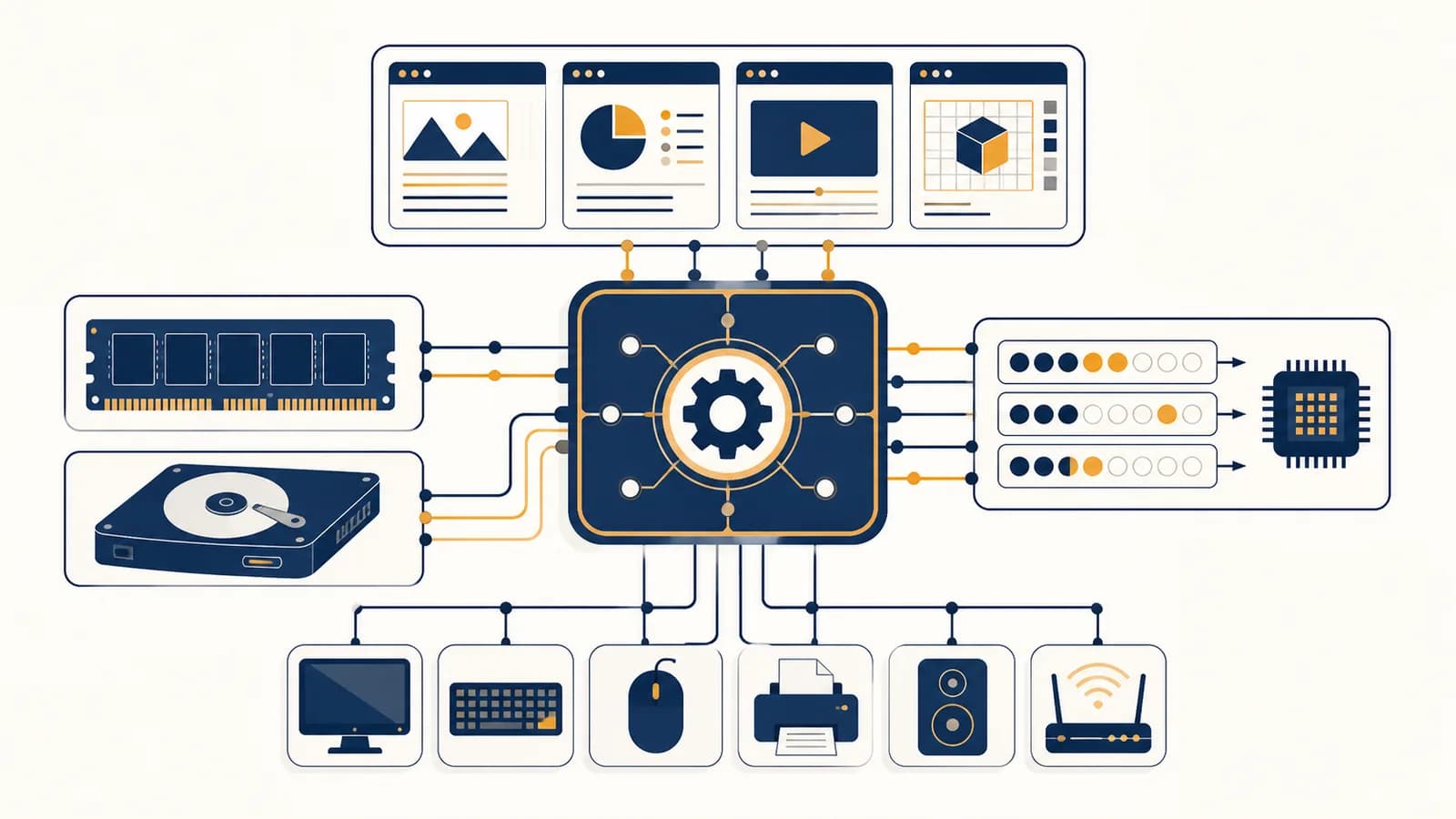
Operating system software is a resource manager that controls hardware, runs applications, and provides common services, in the context of a computer or digital device. An operating system, often shortened to OS, exists so each program does not need to control the processor, memory, storage, screen, keyboard, and network hardware by itself. Windows, macOS, Linux, Android, and iOS all perform this job. They make one machine feel like many orderly, separate workspaces even though its programs must share the same physical parts.
What an operating system actually is
An operating system is the privileged layer of software between applications and hardware. It defines controlled ways for programs to request resources, decides which requests run and when, and prevents one faulty or hostile program from freely taking over the whole machine.
The word system matters. An OS is not one giant program. It is a collection of cooperating parts. The kernel performs the most sensitive work. Device drivers operate particular hardware. System libraries give applications convenient functions. Background services handle tasks such as networking, printing, login, and timekeeping. A user interface, such as a desktop or command shell, lets a person start and manage programs.
“Read these bytes from my file” or “send this packet.” It uses a documented interface and does not need to know the disk controller or network adapter model.
It checks permission, translates the request into hardware work, waits for completion, and reports a result or an error to the application.
This separation makes software portable. A browser can call the operating system's file and network services instead of containing instructions for every storage device and Wi-Fi chip ever made. The same separation also gives the OS a place to enforce rules. A notes app can read its own files without gaining permission to inspect every other program's data.
The OS itself rests on physical mechanisms. A processor follows binary instructions, memory cells hold bit patterns, and logic gates enforce privilege checks. The page on how binary values become logic and circuits explains that lower layer. An operating system turns those mechanisms into useful concepts such as a process, a file, a window, and a user account.
How the kernel works
The kernel works by running with privileges that ordinary applications do not have. Applications request protected operations through system calls; the processor switches into kernel mode, the kernel validates the request, performs or schedules the work, and then returns control.
Modern processors provide at least two levels of authority. In user mode, an application cannot directly reprogram memory protection, control a storage device, or disable interruptions. In kernel mode, trusted OS code can perform those operations. This is a hardware rule, not a polite request that applications are expected to obey.
Suppose a text editor saves a document. Its library turns a request such as “write these bytes” into a system call. The kernel checks that the supplied memory belongs to the editor and that the open file permits writing. A filesystem component decides where the data belongs. A device driver issues commands understood by the storage controller. The hardware later signals completion, often with an interrupt, and the kernel reports success or failure.
A system call is a controlled doorway. It lets an untrusted application ask trusted kernel code to do one specific operation without giving the application kernel authority.
Interrupts let hardware get the processor's attention. A key press, arriving network packet, or completed storage request can cause the processor to pause its current instruction stream and enter a registered kernel handler. The handler records what happened and arranges any longer work. It should return promptly so the machine remains responsive.
Drivers translate general OS operations into device-specific commands. A filesystem can ask to read a numbered block without knowing how a particular solid-state drive moves data. Driver defects are especially serious because many drivers run with kernel privileges. Some operating systems isolate selected drivers or services in separate processes to reduce the damage a failure can cause.
How processes and threads share a processor
Processes and threads share processors through scheduling. The OS keeps records of runnable work, chooses a thread for each available processor core, lets it execute for a bounded period or until it blocks, then saves its state and selects another.
A process is a protected running environment
A process is an executing program together with its address space, open resources, security identity, and kernel records. Two copies of the same application are usually two processes. They may execute identical instructions while holding different documents, memory, and permissions.
A thread is a schedulable path through a process
A thread is one sequence of instructions inside a process. Threads in one process normally share code and data, but each thread has its own instruction position, processor registers, and call stack. A music app might use one thread for its interface and another for audio processing.
A thread enters the runnable state because a program starts, input arrives, or a wait finishes.
The kernel selects a runnable thread using priority, fairness, deadlines, and recent processor use.
The kernel restores the thread's saved registers and transfers control to its next instruction.
The thread finishes, waits for an event, makes a system call, or is preempted so another thread can run.
A context switch is the handoff between threads. The kernel saves enough processor state to resume the old thread later, then restores the new thread's state. Switching has a cost because it consumes processor time and can displace useful cached data. Still, rapid switching creates the practical illusion that many programs progress at once on a single core.
On a processor with multiple cores, some threads genuinely run at the same instant. The scheduler must balance work without constantly moving it. A video call may have threads handling sound, camera input, screen drawing, encryption, and network traffic. If one waits for a packet, another can use the core.
Three runnable threads each need 8 milliseconds of processor time. On one core with a 4 millisecond time slice, the scheduler can run A, B, C, then A, B, C. Each receives two turns and completes after 24 milliseconds of total processor work, before adding switching time.
Priority is useful but dangerous. An audio thread needs timely service to avoid gaps, while a background file index can wait. If high-priority work never stops arriving, low-priority work can starve. Schedulers therefore combine priority with policies designed to preserve progress and interactive response.
How virtual memory works
Virtual memory gives each process its own numbered address space and maps those virtual addresses to physical memory under kernel control. Hardware checks the mapping on every memory access, providing isolation while allowing controlled sharing and storage-backed pages when needed.
A program might refer to address 10,000, but that number does not directly name a chip location. The processor's memory management unit consults page tables prepared by the kernel. A page table entry can point to a physical frame and record whether the page may be read, written, or executed. If a mapping is absent or forbidden, the processor raises a fault and enters the kernel.
With 4,096-byte pages, address 10,000 is on page 2 at offset 1,808, because .
Page size depends on the architecture and configuration; 4,096 bytes is a common base page size and makes the arithmetic visible. Page tables can map process A's page 2 and process B's page 2 to different physical frames. Each process can therefore use the same virtual address without touching the other's data.
A page fault is not automatically an error. The kernel might load a requested part of a program from storage, create a new zero-filled page, or copy a shared page when a process first writes to it. An invalid access, such as writing to a read-only page, can instead cause the OS to terminate the process or deliver an error signal.
If physical memory becomes scarce, the OS may move inactive page contents to storage and reuse their frames. Accessing one of those pages later requires slow storage input, so heavy paging can make a machine feel frozen even while the processor is not busy. Closing memory-hungry applications helps because it reduces the number of pages competing for physical memory.
How files and storage become an organized system
A filesystem turns raw storage blocks into named files and directories with sizes, ownership, permissions, and timestamps. The OS resolves a path, checks access, locates the file's data blocks, caches useful data in memory, and coordinates updates so programs share storage safely.
A storage device presents numbered units of data, not folders with meaningful names. Filesystem metadata records which blocks belong to which file and how directory names connect to file records. The path /school/history/essay.txt is resolved one directory component at a time. At each step, the kernel confirms that the named entry exists and that the requesting process may traverse or open it.
File descriptors make open resources manageable
After opening a file, a process usually receives a small identifier called a file descriptor or handle. Later reads and writes use that identifier. The kernel's record tracks the underlying object, current position, access mode, and other state. The same pattern can represent pipes, devices, and network connections.
Caches make repeated access faster
The OS keeps recently used file data in memory because memory access is much faster than storage access. A write call may initially update a memory cache, with the OS sending the changed blocks to the device later. Applications that require confirmed persistence can request stronger synchronization, accepting a delay.
“Save completed” can describe different stages. Data may have reached an OS cache but not durable storage. Applications handling valuable records use synchronization and recovery designs to survive power loss at awkward moments.
Filesystems use techniques such as journaling or copy-on-write updates to recover consistent metadata after interruption. The exact technique differs, but the goal is concrete: after a crash, a directory entry should not point into random reused space. Applications need their own consistency rules too. A filesystem can preserve bytes without knowing whether half of a multi-file business transaction is meaningful.
This boundary becomes clearer in a database. The OS provides files, buffering, permissions, and device access. A database adds queries, indexes, transactions, and rules about which related changes must succeed together.
How devices and networks use the same OS pattern
Devices and networks use the same request, queue, interrupt, and permission pattern as storage. Applications call a general interface, the kernel validates and buffers the operation, a driver communicates with hardware, and completion becomes an event the waiting program can receive.
Consider a keyboard. The device reports a physical event through its controller. An interrupt alerts the kernel. A driver interprets a hardware code, while higher input layers apply the selected keyboard layout and route the event to the appropriate session or window. The application receives a key event, not a voltage transition from a particular USB controller.
A display follows the opposite direction. An application draws into a controlled memory surface. A window system or compositor combines surfaces, accounts for position and visibility, then submits a finished frame for display. This design prevents every application from independently fighting for the screen hardware.
Networking adds protocols, addresses, and remote machines, but the local handoff is familiar. A browser writes bytes to a socket. The OS breaks work into protocol units, queues packets for a network interface, and accepts incoming packets through a driver. For the path beyond the device, the route from local packets to internet services follows the data through routers, names, and layered protocols.
Buffers absorb timing differences. A program and a device rarely operate at exactly the same rate. If an application writes faster than a network connection can send, the buffer eventually fills and the write must wait or return a status that means “try later.” This backpressure prevents unlimited memory use. Similar queues sit behind audio, printing, and storage.
Operating system versus kernel and application software
The kernel is the privileged component that controls resources; the operating system is the larger package containing that kernel and its system tools. Application software uses the package to perform a chosen task without receiving the kernel's unrestricted hardware authority.
People often use the terms as if they were interchangeable because the boundary depends on context. When diagnosing a driver crash, “kernel” is precise. When comparing Windows, macOS, and a Linux distribution, “operating system” describes the whole installed environment. Linux strictly names a kernel, while distributions combine that kernel with system utilities, libraries, installers, and desktop choices.
Enforce address-space protection, schedule threads, handle system calls, and mediate direct hardware access.
Provide login, system configuration, background services, software installation, common libraries, and ways for people and applications to use kernel facilities.
Application software depends on the operating system
Application software performs a user's chosen task, while an operating system allocates and protects the shared machine on which applications run. The boundary can blur, but authority and dependency are better tests than whether a program came preinstalled.
A calculator, browser, and video editor are applications. They can usually be replaced without removing the platform other programs depend on. A desktop file manager is also an application: it presents files using OS services, but it is not the filesystem. The scheduler and virtual-memory manager are OS facilities because applications cannot safely substitute their own versions while sharing hardware.
If a photo editor crashes, the OS should close its resources while other programs continue. If the kernel loses control of memory mappings or a storage driver, the whole device may need to stop or restart because the manager itself can no longer guarantee safe operation.
This layered view is a recurring idea across Computer Science. Interfaces let one component depend on a service without copying its entire implementation. Protection rules constrain failure. Abstraction gives programmers a stable object, such as a file or socket, while lower layers handle changing hardware details.
How operating systems protect and restore control
Operating systems protect control by checking identities and permissions, isolating memory, and limiting access at kernel boundaries. During startup and recovery, a staged boot process establishes that control again, loads trusted services, and restores consistent storage after an interruption.
Authentication establishes an identity
Authentication checks a claimed identity using something such as a password, security key, or biometric credential. After login, the OS gives processes a security context linked to the account and session. Authentication does not itself decide every action. It supplies the identity on which authorization decisions can be based.
Authorization checks a requested action
Authorization asks whether that identity may perform a particular operation on a particular resource. File ownership and permission entries are familiar examples. Mobile systems also prompt for access to the camera, microphone, location, or contacts. The kernel or a trusted system service must enforce the answer at the resource boundary.
Isolation limits the result of a failure
Memory isolation blocks an application from simply reading another process's address space. Sandboxes can further limit files, devices, system calls, and network destinations. Containers use OS isolation mechanisms to give groups of processes separate views of names and resources, although they still share a host kernel.
Updates matter because OS code occupies a position of broad trust. A security flaw in a driver, system service, or kernel interface may let an attacker cross a protection boundary. Signed software, restricted privileges, secure startup checks, and timely patches add separate barriers. No one barrier proves that all code is safe.
Cloud servers rely on these same mechanisms, often with extra isolation supplied by virtual machines. A hypervisor assigns virtual processors, memory, and devices to guest operating systems, while each guest OS manages its own processes. The explanation of how remote machines are divided into cloud services shows why these layers let many customers use shared physical hardware.
An operating system starts through a chain of trust and control
An operating system starts through increasingly capable programs. Firmware initializes enough hardware to find a bootloader, the bootloader loads the kernel, the kernel prepares memory and devices, and the first system services create the usable environment.
Processor reset rules lead to firmware, which checks basic hardware and finds a configured boot target.
The loader places kernel code and startup information in memory, then transfers control.
The kernel configures memory management, interrupts, scheduling, and enough devices to reach the system files.
Initial processes launch networking, login, graphical interfaces, and other configured services.
A clean shutdown reverses some responsibilities. The OS asks applications and services to stop, writes cached changes to storage, unmounts filesystems, and tells devices to enter a safe state. Pulling power skips those steps. Recovery code must then distinguish completed updates from partial ones and restore consistent structures.
A restart repairs state, not causes. It clears processes, rebuilds kernel data structures, and reinitializes devices. If damaged hardware, bad code, or a wrong configuration remains, the failure can return.
Crash information helps engineers find the cause. Kernel logs, application logs, memory dumps, and error codes preserve evidence about the failing component and recent events. Safe recovery may select an older system snapshot, disable an optional driver, or start with fewer services. The precise response depends on which layer failed.
How operating systems show up in phones, cars, and servers
Operating systems appear anywhere several software tasks must share hardware under timing, safety, power, or security rules. Phones emphasize battery and app isolation, servers emphasize throughput and administration, while embedded systems may emphasize predictable timing and limited resources.
A phone OS pauses or restricts background applications to save energy. It brokers access to sensors and personal data, manages cellular and Wi-Fi radios, and keeps touch input responsive. The visible home screen is only one application-facing layer over scheduling, memory, storage, and driver machinery.
A server OS often runs without a local screen. Administrators care about remote login, process supervision, access control, storage reliability, networking, and measurable resource use. One server may run a database, web service, monitoring agent, and backup process. The scheduler and memory manager must keep an overload in one service from making every other service unusable.
Cars contain many computers with different jobs. An entertainment unit can use a feature-rich general-purpose OS. A controller responsible for a strict physical deadline may use a real-time operating system, or RTOS, whose scheduling behavior is designed to provide bounded response under stated conditions. “Real-time” means deadlines matter; it does not simply mean fast.
3 mistakes people make with operating systems
Three common mistakes are treating the visible desktop as the whole OS, assuming unused memory is always better, and believing multitasking means every program runs continuously. Each mistake hides a mechanism that explains ordinary behavior and helps diagnose real problems.
1. The desktop is the operating system
The desktop is a user interface built on OS services. It draws windows, launches applications, and presents files, but scheduling and protection continue even on machines with no graphical display. A frozen desktop might reflect one failed interface process rather than a dead kernel. Conversely, a moving pointer does not prove that storage or networking is healthy.
2. Free memory is always productive memory
Unused physical memory provides no immediate benefit. An OS can use available space to cache recently read files and discard that cache when applications need more. A display showing little “free” memory is not by itself evidence of a leak. The useful questions are what holds the memory, whether it can be reclaimed, and whether the system is paging heavily.
3. Every open program runs all the time
Many threads spend most of their time waiting. A text editor may sleep until a key arrives. A chat client may wait for network data. The kernel records these blocked states and schedules other work instead of wasting processor cycles. High processor use means runnable work is competing, not simply that many windows are open.
The takeaway: Watch resources, not icons. Processor time, physical memory, storage input and output, network queues, permissions, and process states reveal what the invisible manager is actually doing.
How do operating systems show up in questions you can test?
Operating systems become visible through three testable questions: what resources are active, whether a machine needs an OS at all, and which policies affect speed. Process monitors, small experiments, and workload measurements provide evidence without requiring changes to protected system files.
How can you see the operating system at work?
Built-in process and resource monitors expose OS decisions. They show which processes run or wait, how processor and memory use change, which files or sockets are open, and which permissions apply.
Open the task or activity monitor on a computer you control. Sort processes by processor use, then start a calculation-heavy application and watch its position change. Next, open a large file and observe memory use. Close the application and notice that cached memory may not immediately return to a label called “free.” The OS can reclaim it later.
A command shell exposes the same model with more precise tools. Process listings show identifiers and states. Filesystem tools show ownership, space, and mount points. Network tools show listening endpoints and active connections. Logs record service starts, device recognition, permission failures, and crashes. Use read-only inspection first, especially on a shared or school-managed machine.
Copy one large file between folders while watching storage activity, then copy it again. The second read may complete differently because useful data remains in the filesystem cache. Exact results vary with file size, available memory, storage hardware, and whether both folders use the same device.
These observations turn vague complaints into testable statements. “The computer is slow” might become “one process keeps a core busy,” “memory pressure is causing repeated storage reads,” or “a network request is waiting for a remote reply.” Each description points toward a different layer and a different next check.
Can a computer run without an operating system?
A computer can run without a general-purpose operating system if one program directly controls the hardware, but that program must then handle every needed device, timing event, and failure. This approach fits some small embedded systems, not typical multipurpose computers.
A microcontroller in a simple appliance may start one fixed program after power-on. Its code reads sensors, updates outputs, and responds to timers. If the task is small and predictable, adding process isolation, a filesystem, and a full scheduler may waste memory and complicate certification.
The tradeoff changes as features accumulate. Separate communications, display, logging, and control tasks need coordination. Drivers must be reused. Faults should be contained. An OS supplies established mechanisms for these needs. Even then, designers may choose a compact RTOS rather than a desktop system. The decision follows workload and risk, not the mere presence of a processor.
Does the operating system make a computer fast?
An operating system cannot create processor cycles or memory bandwidth, but its policies strongly affect perceived and measured speed. Scheduling, caching, buffering, driver quality, background work, and memory pressure determine how efficiently applications receive the hardware resources that already exist.
Performance is also a choice among competing goals. Keeping more file data cached can accelerate later reads but uses memory. Combining writes can improve storage efficiency but delay confirmed persistence. Longer scheduling slices reduce switching overhead but may make interaction feel less responsive. Power-saving states extend battery life but can add wake-up delay.
For a checkable example, suppose useful work takes 90 milliseconds and unavoidable waiting takes 10 milliseconds. The elapsed time is 100 milliseconds, so useful work occupies , or 90 percent, of the interval. Reducing a tiny scheduling overhead cannot remove the separate 10 millisecond wait. Measurement must identify the limiting resource before tuning begins.
The invisible manager makes layered computing possible
An operating system makes layered computing practical by turning processors, memory chips, storage blocks, and device signals into protected services that many programs can share. Its abstractions simplify programming, while its enforcement mechanisms keep convenience from becoming unrestricted access.
The deepest idea is mediation. An application does not seize a core forever; it becomes schedulable work. It does not claim arbitrary memory; it receives mapped pages. It does not send raw commands to every device; it uses a driver-backed interface. It does not trust every path or packet; the OS checks identity, permission, ownership, and state at specific boundaries.
That pattern connects operating systems to the rest of computing. Hardware provides mechanisms such as interrupts and privilege levels. Algorithms determine scheduling and caching policies. Data structures represent queues, page tables, directory trees, and process records. Networks extend communication beyond one machine. Security asks which principal may cross each boundary.
Next time an application pauses, a permission prompt appears, a file finishes saving, or a phone stops a background task, name the resource being managed and the boundary being enforced. That habit turns an invisible OS into a system you can observe, question, and eventually build.