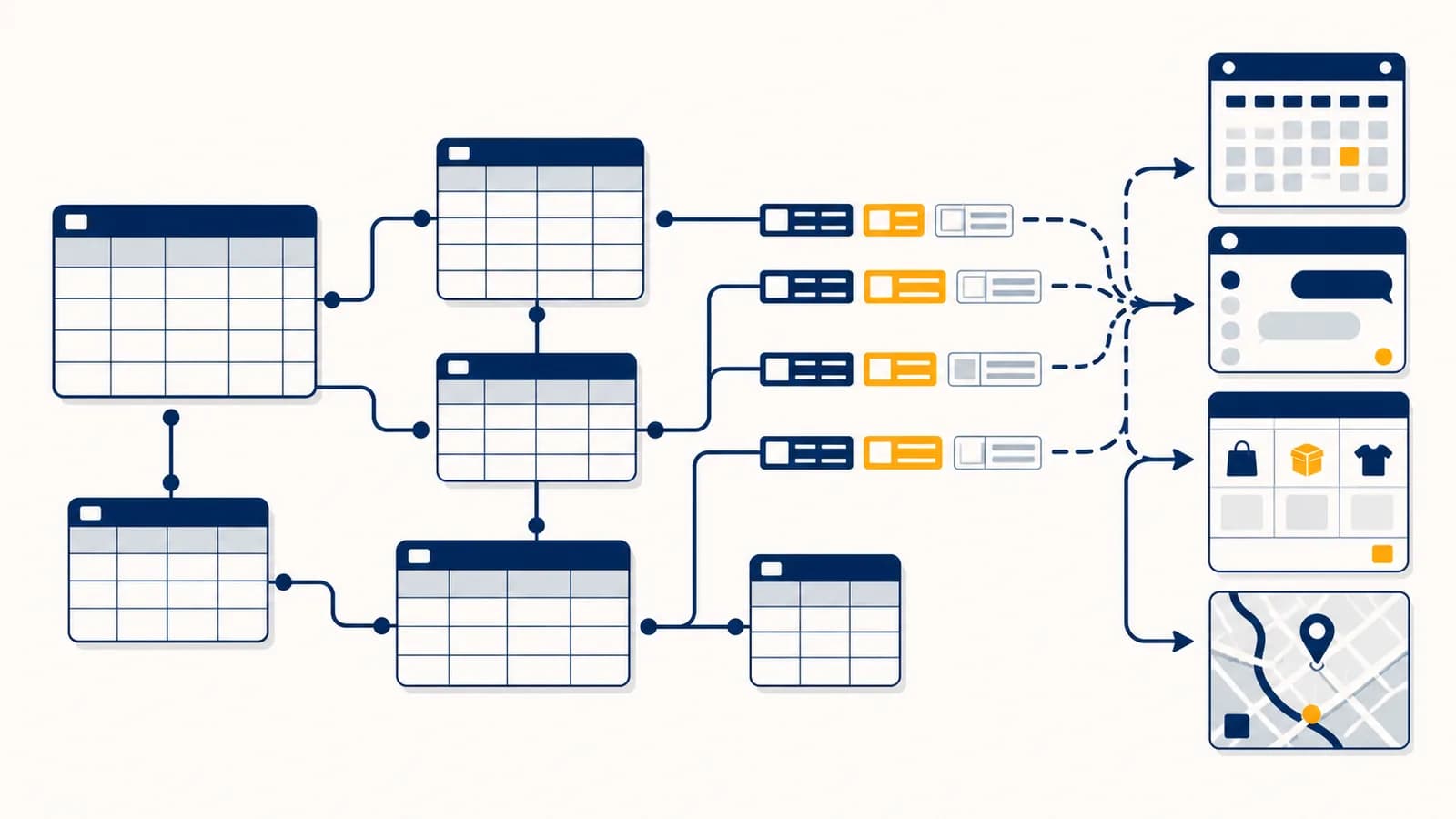
A database is an organized system that stores, retrieves, and updates related data, in the context of computer science and software applications. A database stores data so people and programs can find the right record, change it safely, and keep related facts consistent. Database management systems, often called DBMSs, provide the rules and tools for doing that work. SQL databases arrange much of their information in tables, while other database types use documents, key value pairs, or graphs. The idea exists because a growing collection of facts becomes difficult to search, share, protect, and correct if each program keeps loose files of its own.
What a database actually is
A database is a structured collection of data managed so that many facts can be stored, searched, changed, and connected without treating every fact as a separate file. The database includes the data, while database management software controls access to it.
Imagine a school system that needs to record students, classes, teachers, rooms, attendance, and grades. A folder of documents can hold those facts, but it does not define which student a grade belongs to or prevent two staff members from assigning the same room at the same time. A database can represent each kind of thing, connect related records, and enforce selected rules.
The software that performs this work is a database management system. PostgreSQL, MySQL, SQLite, Microsoft SQL Server, and Oracle Database are examples of relational DBMSs. The application and the DBMS have different jobs. A school portal draws buttons and pages, applies school policies, and sends requests. The DBMS stores records, interprets queries, checks constraints, controls concurrent changes, and writes durable data to storage.
Knows what a student, booking, or payment means to the organization. It decides which actions the interface offers.
Knows how records are represented, connected, found, protected, and written safely. It enforces declared data rules.
A database is not necessarily one visible file, one computer, or one table. A small SQLite database can live in one file on a phone. A large service can split its data across many storage devices and machines. In both cases, the defining feature is managed structure: software presents a controlled way to read and change persistent data.
What tables, rows, columns, and keys actually are
In a relational database, a table represents one kind of entity or event, a row represents one recorded instance, and a column represents one named attribute. The table definition also assigns data types and may impose rules on allowed values.
A table named Students might have columns called student_id, name, birth_date, and email. One row represents one student. A separate Courses table might hold course_id, title, and teacher_id. Keeping distinct kinds of records in distinct tables makes their meanings explicit.
| student_id | name | birth_date | |
|---|---|---|---|
| 1042 | Maya Chen | 2009-04-18 | [email protected] |
| 1087 | Idris Bello | 2008-11-03 | [email protected] |
The column type limits what can be stored. A date column holds dates rather than arbitrary sentences. An integer column can be sorted and calculated as a number. A NOT NULL rule can require a value, while a UNIQUE rule can reject a duplicate email address. These rules turn assumptions in a programmer's head into checks the DBMS performs for every permitted writer.
A blank value is not always an empty value. In SQL, NULL usually means missing or unknown. It differs from an empty string and from the number zero, so queries must handle it explicitly.
A good table records one fact once when possible. If every enrollment row repeats a student's name and email, correcting that email requires finding every copy. A separate student row gives the fact one home. This design practice is part of normalization, which reduces duplicated data and the contradictions duplication can produce.
How keys and relationships work
Keys give rows stable identities and connect records across tables. A primary key uniquely identifies a row, while a foreign key stores the primary key of a related row and can stop the database from accepting a reference to nothing.
Names make poor identifiers because two people can share a name and one person can change theirs. A generated student_id can remain stable. If student 1042 enrolls in course 73, an Enrollments row can store both numbers. The numbers form a precise link even if the displayed student name or course title changes.
This enrollment table also solves a many to many relationship. One student can take several courses, and one course can contain several students. Each enrollment row joins one student to one course. It can also hold facts about that connection, such as enrollment date or final grade.
A foreign key rule can reject an enrollment whose student_id does not exist. It can also define what happens when a referenced row is deleted. The database might block deletion of a student who still has enrollments, or it might delete dependent records automatically. That choice encodes a policy and should be deliberate.
Keys are part of data modeling, the work of translating a real system into entities, attributes, relationships, and constraints. That translation is never purely mechanical. A household, a shipping address, or a legal customer can mean different things in different organizations. The schema must represent the meaning the application actually needs.
How a database works from request to result
A database turns a structured request into a plan, reads the needed pages from memory or storage, checks each row, and returns or changes matching data. For updates, it also records enough information to preserve the change and recover after failure.
A program asks for data or requests a change, often using SQL plus separate parameter values.
The system checks the query's grammar, confirms that named tables and columns exist, and verifies the user's permissions.
It compares possible operations, such as scanning a table or using an index, and estimates which valid plan should cost less.
It loads data pages, follows index entries, filters rows, combines tables, sorts when needed, and computes requested values.
A read produces result rows. A successful transaction makes its changes durable and visible according to the database's concurrency rules.
Storage is commonly handled in fixed-size pages rather than as isolated rows. The DBMS keeps frequently used pages in memory because memory access is faster than storage access. Its file layout, buffer manager, indexes, and transaction log work together below the level most application programmers see. The computer's management of memory, files, and processes supplies services the DBMS depends on.
A database server may receive requests through a network connection. The query crosses that connection as a message, the server computes the answer, and the result travels back. The addressing, packet delivery, and connection behavior belong to the mechanisms that move data across networks, while the DBMS remains responsible for interpreting the query and protecting stored records.
You search a ticket site for seats on one performance. The application sends the performance identifier and filters to its database. The DBMS may use an index to find matching seats, discard unavailable ones, and return the remaining rows. When you reserve one, a transaction prevents two completed purchases from owning the same seat.
The result is not automatically every piece of data the system has. A query selects columns and rows, and permissions can narrow access further. Good systems send only the data required for the current action. This reduces work and limits exposure if an application screen or account is misused.
How queries turn questions into operations
A query is a structured instruction that tells a database what data to read or change. In SQL, the writer states the desired result, and the DBMS chooses physical operations that can produce it while obeying the schema and permissions.
Consider a library with Books, Members, and Loans tables. A request for overdue books could join each loan to its book and member, keep loans whose due date has passed and whose return date is missing, then order the matches by due date. SQL describes that result without directing the storage device to a particular byte.
A simplified query might read:
SELECT Books.title, Members.name FROM Loans JOIN Books ON Loans.book_id = Books.book_id JOIN Members ON Loans.member_id = Members.member_id WHERE Loans.due_date < CURRENT_DATE AND Loans.returned_at IS NULL;
The SELECT list chooses output columns. Each JOIN follows a relationship expressed by matching keys. The WHERE condition removes rows that do not meet the test. The query returns a derived result; it does not create a second permanent copy of every matching record.
Queries can also aggregate records. A ticket system can group sales by performance and count seats. An energy app can group readings by day and calculate an average. The output is computed from stored rows, so a carefully designed query can answer a new question without changing how the original facts are stored.
Three stored readings, 18, 21, and 24, produce an average of 21. The arithmetic is performed when the query runs.
Applications should pass user supplied values as parameters instead of building SQL by pasting text together. Parameterization lets the driver keep data separate from commands. That separation blocks a common form of SQL injection, in which hostile input is interpreted as part of a query rather than as a value.
Database versus spreadsheet
A spreadsheet is an interactive grid built for calculation and direct editing, while a database is a managed data store built for structured queries, constraints, relationships, and controlled concurrent access. Either can hold rows and columns, but their operating models differ.
A spreadsheet works well when one person is exploring a modest dataset, testing a budget, or arranging a report. Formulas and charts sit close to the cells, and changing a value is immediate. A database is a better fit when an application must serve many users, enforce relationships, keep an audit trail, or process updates without people editing cells directly.
Cells can contain values or formulas. Layout carries meaning. People often edit the grid directly, and a workbook commonly mixes data, calculations, and presentation.
A schema defines record structure. Queries read or change data. Applications mediate most access, and constraints can apply the same rules to every writer.
The boundary is practical rather than moral. A class club does not need a database server for a short guest list. A hospital should not rely on one shared worksheet as the sole system for medication orders. Ask about scale, relationships, simultaneous writers, error consequences, permissions, and recovery. The answers point toward the suitable tool.
A comma separated values file is simpler still. It can encode a rectangular set of values, but it does not supply types, keys, permissions, transactions, or query execution by itself. Programs can add those behaviors around a file, but then those programs are rebuilding pieces a DBMS already provides.
How transactions keep related changes together
A transaction groups database operations into one logical unit that either commits as an accepted change or rolls back without leaving a partial result. Transactions also control what simultaneous users can observe while their work overlaps in time.
Picture a transfer of 30 units from account A to account B. The program subtracts 30 from A and adds 30 to B. If power fails after the subtraction but before the addition, the data must not preserve half the transfer. Both updates belong in one transaction.
The total remains 150 because the subtraction and addition commit together. A failed transaction rolls back to the earlier state. Real financial systems add ledgers, authorizations, reconciliation, and other controls, but this small example shows the database mechanism clearly.
The traditional ACID initials name four transaction properties. Atomicity keeps the unit together. Consistency means a valid transaction carries the database between states that obey its declared rules. Isolation limits interference among concurrent transactions. Durability means a committed result survives a process crash or restart under the system's stated guarantees.
Isolation is not the same as forcing every task to run alone. Databases use locks, multiple row versions, or both so useful work can overlap. The exact isolation level controls which intermediate effects a transaction may observe. Stronger isolation can simplify reasoning, but it can also require more waiting or cause transactions to retry.
A successful screen is not proof of a committed transaction. Applications must handle timeouts and uncertain network outcomes carefully. Retrying a payment or order blindly can repeat an action unless the operation has an idempotency design.
Durability is commonly supported by a transaction log. Before modified data pages all reach their final storage locations, the DBMS records an ordered description of changes in a log. After a crash, recovery can replay committed work and discard incomplete work according to the log.
How indexes make searches faster
An index is an additional data structure that helps the DBMS locate selected rows without examining every row in a table. It improves suitable reads, but it consumes storage and adds work whenever indexed values are inserted, deleted, or changed.
An index resembles a book index in purpose, though its internal structure is dynamic and machine readable. An index on email stores email values in an organized structure with references to corresponding rows. A lookup for one email can follow the structure toward a small set of candidates instead of testing the email in every row.
B-tree indexes are common because they keep keys ordered and support equality tests, ranges, and ordered scans. Hash indexes organize keys by hash value and suit particular equality lookups. Some systems offer specialized indexes for geographic shapes, full text, arrays, or document fields. The useful type depends on the query operators and the database engine.
An index is not free speed. Adding an order inserts a table row and may update indexes on order number, customer, date, and status. Too many indexes increase write cost and storage use. An index can also be unhelpful when a query needs most of the table, when the indexed column has little useful selectivity, or when the query transforms the column in a way the index cannot support.
Database administrators and software engineers inspect query plans to see what the optimizer chose. The plan can reveal a full scan, an index lookup, the order of joins, sorting work, and estimates that led to the choice. Performance work starts with a measured slow query and its plan, not with adding indexes by reflex.
What SQL and NoSQL actually mean
SQL names a language used mainly with relational databases, while NoSQL covers several nonrelational data models, including documents, key value stores, wide columns, and graphs. The categories overlap in features, so the needed access patterns and guarantees matter more than the label.
A relational model is strong when data has well defined relationships and the system needs flexible joins, constraints, and transactions across records. An online shop might relate customers, orders, items, products, payments, and shipments. SQL can combine those tables for operational work and reporting without embedding every connected fact in one object.
A document database stores records shaped like nested documents, often resembling the objects an application already uses. A product catalog with categories that have different attributes can fit this model. A key value store retrieves a value by a key and can suit sessions or caches. A graph database represents nodes and edges directly, which can help with paths such as social connections or network dependencies.
Which reads, writes, relationships, failure behavior, and consistency guarantees must this application support?
Which database category sounds newer, handles the most data in a vague claim, or avoids learning how the data relates?
Many relational systems now store JSON documents, and some nonrelational systems support transactions or SQL like query languages. A team may use more than one database because search, analytics, caching, and transactional records impose different demands. Each extra system also adds deployment, monitoring, backup, and expertise costs.
Location is another separate choice. A database can run on a laptop, an organization's own servers, or infrastructure operated by a provider. Learning what cloud computing places on remote infrastructure helps separate the database model from the question of who operates its machines.
How databases stay correct, private, and recoverable
A database protects data through layered controls: constraints preserve valid structure, transactions preserve valid changes, permissions restrict actions, encryption protects selected exposure paths, and tested backups restore information after damage or deletion. No single control can replace all the others.
Correctness starts with the schema. A check constraint can reject a negative quantity. A unique constraint can prevent two confirmed reservations for the same designated identifier if the model expresses that rule correctly. Foreign keys can block orphaned references. Application validation still matters because the application understands policies and can explain errors well, but database constraints defend the shared data boundary.
Privacy starts by collecting only what the purpose requires and limiting who can access it. A reporting account may need permission to read selected views but no permission to delete rows. A service account used by one application should not automatically control every database. Logs and audit records can show which identity performed sensitive actions, provided the logging system itself is protected.
Encryption in transit protects data moving between a client and database server. Encryption at rest protects stored files or devices under the configured threat model. Neither prevents an authorized application from requesting data it is allowed to read. Permissions, application security, secret management, updates, monitoring, and data retention policies remain necessary.
An administrator accidentally deletes current inventory rows at 14:10. A nightly backup can restore an older copy, but orders placed after that copy may be missing. A backup plus retained transaction logs may support recovery to a moment shortly before 14:10. The team must have tested that process before the emergency.
Replication copies data to another database instance so service can continue or reads can be distributed. Backup preserves recoverable history outside the live database's ordinary failure path. Replication can quickly copy an accidental deletion to every replica, so a replica alone is not a backup. Recovery objectives determine how much data loss and downtime an organization can accept.
How databases show up in real work and daily decisions
Databases sit behind ordinary actions whenever a system must remember changing facts and retrieve them by meaning. Booking, healthcare, logistics, retail, government, science, and media systems use different schemas, but all connect records, answer queries, and control updates.
A clinician opening a patient record triggers queries for the correct patient, recent encounters, allergies, and test results. Permissions restrict which staff roles can see or change particular information. Transactions keep an order and its status consistent. Audit records can preserve who accessed sensitive data. The interface may look like a form, but database operations sit behind its fields.
A warehouse system links products, storage locations, batches, orders, and movements. Receiving a box adds a movement. Picking an item for an order adds another. Current stock may be calculated from movements or maintained as a carefully controlled value. Either design must handle simultaneous workers and identify the same product reliably.
A newsroom can store articles, revisions, authors, publication states, and corrections. A laboratory can connect samples, instruments, runs, and measured results. A local council can relate addresses, applications, inspections, and decisions. The nouns change, but the modeling questions repeat: what entities exist, which facts describe them, how are they connected, and which changes must happen together?
Machine learning systems also depend on databases and related data stores. Training examples must be collected, labeled, versioned, and retrieved; predictions may be written back for applications to use. The database does not make the model learn. It supplies organized evidence and operational memory. The distinction becomes clearer when studying how models learn patterns from data.
Database work appears in several jobs. Application developers write queries and data access code. Data engineers move and reshape datasets. Database administrators manage performance, access, backups, and recovery. Security engineers test permissions and investigate exposure. Analysts ask business questions with queries. Domain experts help ensure that terms such as customer, active case, or completed order have definitions the schema can represent.
Three mistakes people make with databases
Most database mistakes come from confusing stored facts with their presentation, trusting application code as the only guard, or planning only for normal operation. Each mistake can create contradictory data, security exposure, slow queries, or recovery failures later.
1. Storing display text instead of stable identity
A label is made for people to read, while an identifier is made to refer to one record without ambiguity. Using a person's name, a product title, or a department label as a key breaks when labels collide or change.
Store a stable key in relationships and keep the current display label as an attribute. If the department called Support becomes Customer Operations, related tickets should not lose their connection. One label update should change what people see without rewriting the meaning of every relationship.
2. Assuming the application will prevent every invalid write
Application checks provide useful messages, but they do not cover scripts, imports, administrator tools, old service versions, or two requests racing each other. Rules that must always hold also belong in database constraints and transaction boundaries.
For example, two clients can both check that a username appears available before either inserts it. An application only check allows both to proceed. A unique constraint makes the database decide at the moment of insertion, so one succeeds and the other receives a conflict to handle.
3. Treating backup, replication, and availability as one feature
Availability keeps a service usable, replication maintains additional live copies, and backup preserves recoverable history. They address related but different failures. A system can stay online while returning corrupted data, and replicas can faithfully copy the corruption.
Teams need explicit answers for machine failure, region failure, operator error, malicious deletion, and faulty software changes. They also need restore practice. Storage capacity and green status indicators cannot establish that a damaged database can be recovered to an acceptable point in acceptable time.
Databases make computer systems remember with rules
Databases connect the abstract parts of Computer Science to persistent facts: data structures organize records, algorithms choose access paths, operating systems manage resources, networks carry requests, and security controls authority. A database makes those ideas observable in every saved order, grade, message, or measurement.
The next time an app shows a list, changes a status, or warns that a name is already taken, inspect the hidden data model. Identify the likely tables or documents, the stable keys, the relationship being followed, and the rule being enforced. Then ask what happens if two people act at once or the machine fails halfway through.
A small practice design makes the mechanism concrete. Model a library with books, physical copies, members, and loans. Give each entity a stable key. Decide which relationships need foreign keys, which values must be unique, and which operation needs a transaction. Write one query that finds available copies and another that lists overdue loans. Finally, describe how you would restore the records after an accidental deletion.
The takeaway: A database is organized memory with enforceable rules. To understand one, trace how a real fact becomes a record, how keys connect it, how a query finds it, and how a transaction protects its change.