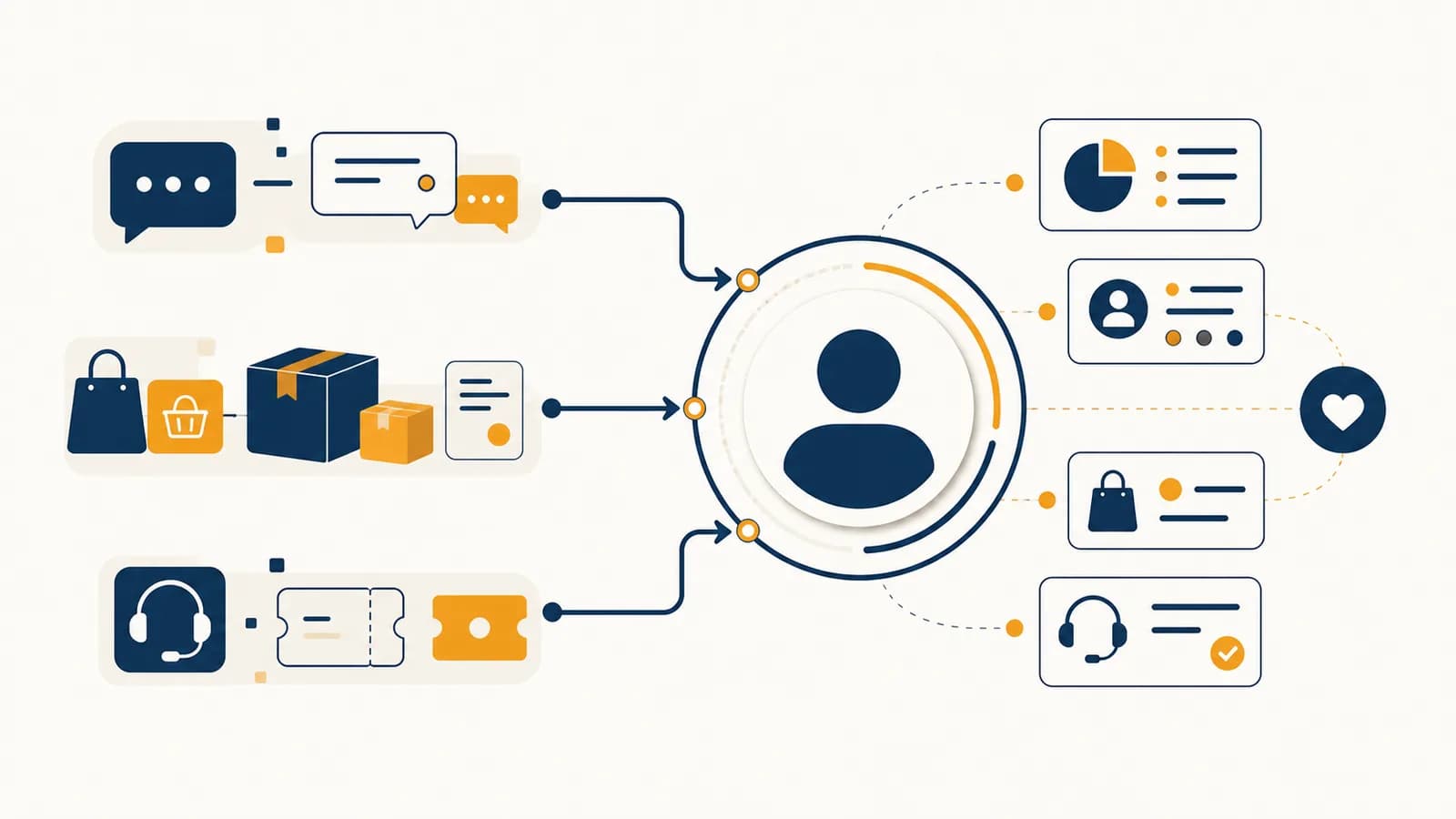
Customer relationship management (CRM) is a business system that records, organizes, and uses interactions with customers and potential customers, in the context of marketing, sales, and service. A CRM system, CRM software, or customer database helps a business remember who contacted it, what each person needs, what happened next, and which action is due. It exists because customer conversations are scattered across forms, email, phone calls, shops, and support requests, while useful follow-up depends on connecting those events to the same person.
What CRM actually is
CRM is both a method for managing customer relationships and the software used to carry out that method. It gives a business a shared record of people, organizations, conversations, purchases, preferences, permissions, and planned actions, so teams can respond with relevant information.
The word relationship matters. A record with a name and email address is only a contact. It becomes useful for relationship management when the record also shows context: the person asked about a blue bicycle, received a quotation, bought a helmet, reported a broken strap, and allowed product update emails. Each event changes what a sensible next action looks like.
The word management does not mean controlling people. It means giving staff a repeatable way to capture an interaction, assign responsibility, decide what should happen next, and check whether it happened. The system supplies memory and structure. A person still has to use judgment.
A CRM record is a working memory, not a biography. It should contain information the business has a legitimate reason to use, not every fact it could collect.
A local repair shop might use a simple CRM to track quotation requests and service reminders. A university might use one to manage inquiries from prospective students. A software company might connect website trials, sales calls, subscriptions, and support tickets. The objects differ, but the mechanism stays recognizable: identify the customer, record the event, update the status, and trigger the next useful action.
How CRM works
A CRM works by turning separate customer events into one ordered record, then using rules and staff decisions to move that record through a process. Each new form, call, purchase, or complaint updates the record and may create a task, message, or status change.
Suppose Maya completes a website form to ask whether a music school offers evening guitar lessons. The CRM checks whether her email address already belongs to a record. If it does, the inquiry joins that history. If it does not, the system creates a new contact. It records the source as the evening lessons page, saves the time and question, and assigns the inquiry to an admissions adviser.
A form submission, shop visit, email, advertisement response, phone call, purchase, or support request enters the system. Some events arrive automatically; staff enter others.
The CRM uses a stable field such as an email address, account number, or customer ID to match the event to an existing record. Weak matching can produce duplicates or attach activity to the wrong person.
The system stores what happened, where it came from, when it happened, and who owns the next action. A controlled status such as new inquiry, qualified, customer, or closed makes records comparable.
A rule may send a confirmation, while a staff member answers the specific question. The CRM can create a due date, route the task, or wait for another event.
The business records the reply, booking, sale, cancellation, or lack of response. That result helps staff manage the case and helps marketers compare groups of cases.
Maya receives a confirmation immediately, but the specific answer comes from the adviser. When she books a trial lesson, the adviser changes her status. Her later enrollment is connected to the original page, so the school can see that the page produced a real student rather than only web traffic. This connection between an initial contact and a later result is one reason CRM data matters to marketing measurement.
What data a CRM actually records
A CRM records identity, interaction, status, transaction, preference, permission, and ownership data. Good records separate stable facts from changing events, use consistent fields for analysis, and retain enough context for action without collecting unrelated personal details that create risk rather than value.
| Data type | Example | What it helps someone do |
|---|---|---|
| Identity | Name, customer ID, work email | Match activity to the right record |
| Interaction | Form submitted, call note, email reply | Understand what has already happened |
| Status | New inquiry, trial booked, active customer | Locate a person in a defined process |
| Transaction | Order date, product, amount, return | Connect communication with commercial outcomes |
| Preference | Preferred branch or product category | Make an offer or response more relevant |
| Permission | Email consent, source, withdrawal date | Respect the person's communication choice |
| Ownership | Assigned adviser and next task date | Make responsibility visible |
These types are often stored in related objects rather than one enormous row. A contact can belong to an organization. That contact can have many activities, opportunities, orders, and support cases. Keeping those objects separate prevents repeated facts from being copied into every event and allows each object to have its own status.
Structured fields and notes serve different purposes. A dropdown containing inquiry sources can be counted reliably. A free text note can preserve the meaning of a conversation. If staff write every source in a notes box, one person may enter “web,” another “website form,” and another “site.” A report will treat those as different values unless someone cleans them. If staff only tick boxes, they may lose an important detail that no predefined field anticipated.
CRM versus a spreadsheet or contact list
A spreadsheet or contact list stores rows of details, while a CRM links records to events, responsibilities, process stages, and automated actions. A small list may work well at first, but it becomes fragile when several people need history, permissions, reminders, and controlled access.
Useful for a bounded list, a one-time project, or analysis. Rows and columns are flexible, but conversations, tasks, orders, and permissions often become extra columns or separate files that drift apart.
Useful for an ongoing process with repeated interactions. Related records, activity history, access controls, validation rules, workflow, and reporting are built around customer work.
The difference is not that a CRM has prettier screens. It is the data model and the behavior around it. Imagine three staff members following up 200 event attendees. In a shared spreadsheet, one person can sort a column incorrectly, overwrite a note, or send to someone who opted out. A CRM can restrict fields, record changes, assign each attendee, and suppress messages according to permission. A badly configured CRM can still fail, but it gives the team tools to define the process.
A spreadsheet remains sensible when the work is temporary, the dataset is small, few people edit it, and no complex history or automation is needed. Moving to CRM becomes reasonable when staff cannot tell which version is current, customers repeat information because earlier contacts are invisible, tasks fall between people, or reports require hours of manual joining.
How CRM shows up in sales and customer service
In sales, CRM tracks a possible purchase through defined stages and scheduled follow-up. In customer service, it tracks a question or problem through ownership and resolution. Both uses connect each new interaction with history, so the customer does not have to restart the story.
A sales process often distinguishes a lead, a person or organization that may have interest, from an opportunity, a specific possible purchase judged worth active work. Those terms only help if the business defines them. If one salesperson calls every downloaded brochure an opportunity while another waits for a confirmed budget and need, the pipeline report compares unlike records.
A theatre company receives a request for 40 group tickets. The CRM creates an opportunity linked to the organizer, records the requested date, assigns the group sales coordinator, and schedules a quotation. When the organizer changes the group size, the quotation and expected value change. If the booking closes, the original inquiry, negotiation, sale, and later service questions remain connected.
Customer service uses a similar structure but usually centers on a case or ticket. The case has a topic, priority, owner, status, and history. A useful status names a real condition, such as waiting for customer information, rather than hiding work under a vague label such as pending. If the customer calls after sending an email, the agent can see the email and avoid asking for the same serial number again.
CRM does not guarantee humane service. A complete history can help an agent solve a problem, but rigid scripts can make the same history feel mechanical. Good design gives the agent relevant context and enough authority to act. It also limits access, because a staff member should see the customer information needed for the job, not every field the business holds.
How CRM shows up in marketing campaigns
CRM shows up in marketing when a business selects an audience from known customer records, sends or coordinates a message, records responses, and connects those responses to later behavior. It turns a broad campaign into traceable contacts with permissions, context, and outcomes.
Segmentation is the act of defining a group by meaningful criteria. A bookshop could select customers who bought a beginner gardening book, chose email updates, and have not returned that order. It could announce a relevant workshop to that group. The rule is explicit and repeatable. “People we think might like it” is not.
Personalization uses record data to change content or timing. Inserting a first name is the shallowest form. Choosing information based on a stated interest, local branch, or current stage can be more useful. Personalization becomes unsettling when the source is unclear, the inference is sensitive, or the message exposes how much tracking occurred. Relevance does not cancel the need for restraint.
A segment is not permission. Finding a person in a database does not by itself make every message appropriate or lawful. Channel, purpose, consent, local law, and the person's choices still govern contact.
A campaign can also write data back to CRM. Delivery, click, form completion, event attendance, purchase, and unsubscribe are distinct events. A click shows that a tracked link was opened; it does not prove careful reading or purchase intent. Marketers need to interpret each signal at the level it actually supports.
The message itself still depends on positioning and creative decisions. CRM identifies the audience and preserves the response history, while the methods behind useful marketing stories explain how information earns attention and communicates meaning.
How CRM automation and artificial intelligence work
CRM automation applies predefined triggers, conditions, and actions to records, while artificial intelligence estimates patterns or generates material from data. Automation follows an explicit rule; AI produces a probabilistic output. Both need clean inputs, limited permissions, review, and a clear route for correction.
A basic workflow can be written as: when an event occurs, if the conditions are true, perform an action. When a trial request arrives, if the country and product match a territory, assign the proper representative and create a task due tomorrow. The system performs the routine routing consistently. It does not decide whether the prospect is trustworthy or deserves respect.
“If a support case has no reply after one working day, alert the team leader.” The inputs, threshold, and action are set by people, and the same condition produces the same action.
“Estimate which inquiries are most likely to book.” A model learns patterns from earlier labeled outcomes and produces scores. The score is an estimate shaped by its training data, selected variables, and objective.
AI features may summarize call notes, draft replies, classify cases, recommend products, or score leads. Each use changes the error cost. An imperfect draft that an employee checks is different from an automatic rejection that a customer never sees. Teams should ask what evidence the output uses, who reviews it, how a person can correct the record, and which groups could be treated unfairly.
Historical data can reproduce historical behavior. If earlier sales staff followed some neighborhoods more quickly than others, a model trained on completed sales may learn that pattern as if it described customer interest. Removing a postcode does not automatically solve the problem, because other fields may act as substitutes. Evaluation must examine outcomes, not only model accuracy.
Automation also magnifies ordinary mistakes. A wrong email typed once affects one record. A wrong segment rule can send thousands of irrelevant messages. Safe workflows use test records, small test groups, approval for high-impact actions, clear stop conditions, and logs showing what ran.
How CRM measurement works
CRM measurement counts how records move through defined stages and connects marketing activity with outcomes such as qualified inquiries, purchases, retention, or resolved cases. Useful measures have clear numerators, denominators, time windows, and definitions, so another person can reproduce the calculation.
A conversion rate is the share of an eligible group that completes a defined action. If 120 people submit a course inquiry and 30 enroll within the chosen period, the inquiry-to-enrollment conversion rate is 25 percent. The arithmetic is visible:
Worked example: .
The formula is simple; the definitions are where errors enter. Do duplicate inquiries count twice? Does an enrollment six months later count? Are staff test records excluded? Did every inquiry have enough time to produce the outcome? Two reports can use the same formula and disagree because their populations or time windows differ.
Pipeline measures show movement and delay. A team can count records entering each stage, compare stage-to-stage conversion, and calculate time spent before the next event. A large number of opportunities means little if their stages are stale or loosely defined. A smaller pipeline with verified needs and current next steps may be more informative.
Attribution asks which marketing activity receives credit for an outcome. A customer might first see a social post, later read a search result, attend a webinar, and finally respond to an email. Giving all credit to the last recorded event is convenient, but it describes a rule, not the full cause. CRM can preserve touchpoints; it cannot run the alternate world in which each touchpoint did not happen. Ideas from how digital channels are planned and measured help explain why channel data must be interpreted rather than simply collected.
Five mistakes people make with CRM
Most CRM failures come from unclear processes, weak data practices, poor adoption, careless automation, or misleading measurement rather than from a missing software feature. A system only improves customer work when definitions, responsibilities, permissions, and daily behavior agree with one another.
1. Treating software installation as a customer strategy
Software can store and route decisions; it cannot decide whom the organization serves or what useful treatment means. A team should define the customer process first: entry points, stages, owners, required information, exit conditions, and exceptions. Otherwise the software turns existing confusion into required fields.
2. Collecting data without a job for it
Every field creates work and risk. Staff must ask for it, customers may have to supply it, someone must correct it, and the organization must protect it. A useful field supports a named decision or action. If nobody can state the job, deletion or noncollection may be the better design.
3. Letting definitions vary by person
A pipeline stage, lead source, or resolution status must mean the same thing across the team. Definitions should describe observable conditions. “Interested” depends heavily on opinion. “Requested a written quotation” describes an event that another person can verify. Training and field guidance keep those meanings visible.
4. Automating before testing the exception
Happy paths are easy to diagram. Real records include shared inboxes, duplicate people, canceled orders, changed consent, employee tests, and customers who move country. A workflow should be tested against awkward cases before it can contact people or change large sets of records.
5. Rewarding the number instead of the outcome
If employees are judged only by calls logged, they may log short calls. If marketers are judged only by leads, they may acquire people who never had a realistic need. Measures shape behavior. A balanced review checks data quality and customer outcomes alongside activity volume, and it examines cases rather than trusting a dashboard alone.
That visibility is useful only if the team can report problems without being punished for revealing them. Duplicate records, skipped fields, and stale tasks are signals about system design as well as individual use. Fixing a confusing form may improve data more than sending another reminder to staff.
How CRM handles consent, privacy, and access
CRM should handle privacy by collecting data for stated purposes, recording communication choices, limiting access by role, protecting stored information, and deleting or retaining records under defined rules. Exact legal duties depend on jurisdiction, but responsible design starts before a campaign is sent.
Consent is not a permanent yes attached to a person. It relates to a purpose and channel, and it can change. A record should distinguish an operational message about an existing order from a promotional message about another product. It should also preserve where and when a choice was recorded so staff can apply it consistently.
Access should follow the job. A support agent may need order history and case notes but not payment card details. A marketer may need a segment count without needing to export every person's full profile. Role-based access, export controls, activity logs, and periodic review reduce the damage caused by mistakes or misuse.
Data quality is also a privacy matter. An incorrect address can send personal information to the wrong household. A bad merge can reveal one customer's case to another. Correction tools, identity checks, and careful duplicate review protect people while improving operations.
A gym wants to email former members about a new class. Before selecting records, staff should identify the message purpose, the lawful basis that applies in their location, each person's current communication choice, the source and age of the data, and a way to stop further messages. “The addresses are in CRM” answers none of those questions.
How long should CRM data be kept?
CRM data should be kept only as long as its defined business purpose and applicable legal duties require. There is no honest universal period. A retention schedule should name each data category, its purpose, its review or deletion trigger, and any justified exception.
An active order, an unresolved safety complaint, a lapsed newsletter permission, and an abandoned inquiry do not have identical purposes. Treating them all as one customer record makes deletion hard. Separating objects and purposes allows the business to remove expired marketing details while retaining a transaction record it still has a legitimate duty to keep.
Retention also affects analysis. Deleting old personal data may limit long-term customer histories, but that does not justify indefinite storage. Aggregated or de-identified results may answer some planning questions without keeping an identifiable profile. The design question is specific: what decision requires this field to remain connected to this person?
How can a small organization choose and start a CRM?
A small organization should choose CRM by mapping its real customer process, identifying required records and integrations, testing a short list with realistic cases, and checking total operating effort. The best starting system is one the team can maintain, govern, and leave if needs change.
Begin with a process sketch made from actual work. List how an inquiry arrives, who responds, which facts they need, what statuses exist, how a purchase is recorded, and what happens after service. Include common exceptions. This exposes requirements that a feature comparison may miss.
Then build a test using invented contacts, not copied personal data. Run a duplicate inquiry, an opt-out, a reassignment, a returned order, and a report. Check mobile use if staff work away from desks. Check export formats and record IDs, because moving data out matters as much as putting it in. Ask who can configure fields and workflows after launch.
- Fit: Does the system represent the process without forcing misleading stages?
- Usability: Can the people doing the work update records quickly and correctly?
- Connection: Can it exchange the necessary data with forms, orders, email, calendars, or support tools?
- Control: Can administrators limit access, record consent, review changes, and manage retention?
- Cost: What will licenses, setup, migration, training, integration, and ongoing administration require?
- Portability: Can the organization export complete, usable records if it changes systems?
A phased start is easier to inspect. One team can use a small set of fields and one workflow, then compare results with the defined process. Early feedback should change the design. Adding every requested field at launch usually creates a crowded screen and missing data rather than completeness.
CRM turns marketing promises into customer treatment
CRM connects what marketing says with what the organization later does. Positioning may promise speed, care, expertise, or simplicity; customer records, task ownership, service history, and measured follow-up reveal whether daily treatment supports that promise across repeated interactions.
This is where CRM belongs within marketing as a whole. Marketing is not finished when a message reaches an audience. The offer must suit a need, the response must be handled, the experience must match the claim, and evidence must return to future decisions. The relationship record connects those moments.
A business that claims fast response can inspect inquiry times and completed follow-up. One that claims personal service can check whether staff see useful context or repeatedly ask customers to retell it. One that claims respect can inspect consent changes, complaint handling, and access controls. The link between customer needs and product positioning explains how the original promise is chosen; CRM shows what happens after a person responds to it.
The takeaway: Look for CRM whenever an organization must remember a customer across more than one interaction. Ask what event enters the record, how identity is matched, who owns the next action, what permission applies, and which outcome returns. Those questions expose the real marketing process.
The wider set of guides to how marketing works in practice places that process beside research, products, prices, communication, distribution, and measurement. CRM contributes the shared memory. Its quality appears in ordinary moments: a relevant reply, a corrected mistake, a respected choice, and a promise that survives contact with the customer.